
OBDocker - OBD2 Car Scanner
Car Doctor Diagnose Issues For Everyone
Screenshots
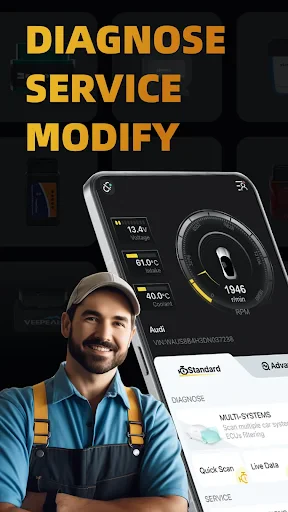
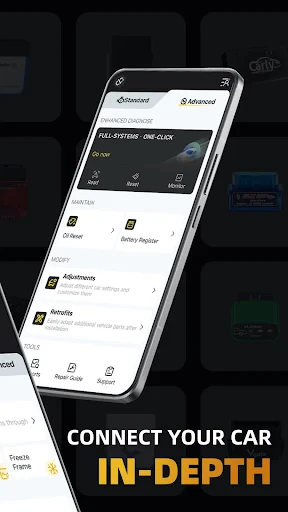
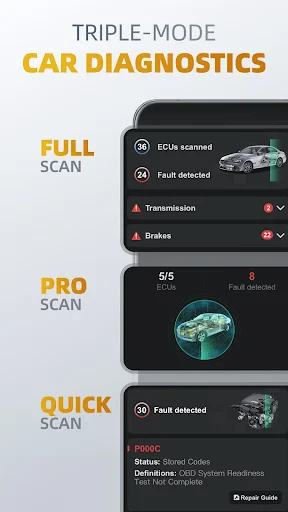
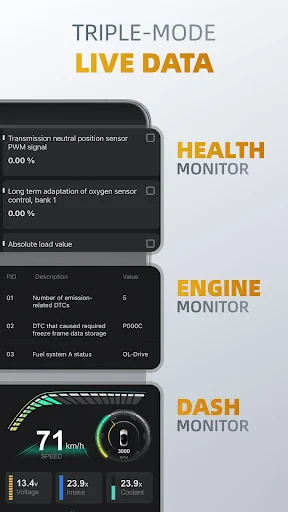
Revving Up Your Ride with OBDocker - OBD2 Car Scanner
Hey there, car lovers! 🚗 If you're the type of person who loves getting to know your vehicle inside and out, then I've got something exciting for you. Let's chat about the OBDocker - OBD2 Car Scanner, an app that's basically like carrying a mechanic around in your pocket. Whether you enjoy fixing things yourself on your car or you just want to make sure it's running perfectly, this app is a total game-changer.
What Makes OBDocker Special?
First off, why even bother with an OBD2 scanner? For anyone unfamiliar, OBD2 is short for On-Board Diagnostics. It's a standard system built into most cars that helps you figure out what's happening under the hood. And trust me, once you start using OBDocker, you'll be amazed you ever managed without it.
This app links up to your car's OBD2 port, letting you read and clear trouble codes, keep an eye on how your engine is performing, and even spot potential problems before they become expensive fixes. It's like having a fortune teller for your car's well-being!
Easy to Use and Packed with Features
Where OBDocker really stands out is its simplicity. The layout is super straightforward. You don't need to be a tech expert or a certified mechanic to understand your car's diagnostic info. The app guides you through every part, from hooking it up to your car to making sense of the data.
- It's a breeze to set up using Bluetooth or Wi-Fi.
- It explains diagnostic codes in plain language, no confusing terms.
- You get live data updates on how your car is running.
Picture this: You're on a long drive, and suddenly the annoying 'check engine' light turns on. Instead of freaking out or hunting for the closest garage, you just grab your phone, open OBDocker, and there you have it! You know precisely what the issue is. It's total peace of mind, right in the palm of your hand.
Your All-in-One Car Care App
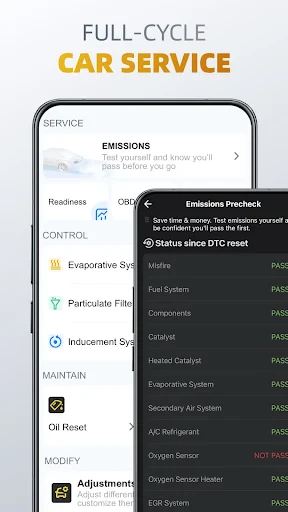
What really makes OBDocker better than other options is its full set of tools. The app does more than just read error codes; it comes with a bunch of features made to keep your car running great. It handles everything from checking your fuel usage to running emission tests.
A feature I really love is the performance monitoring. You can watch your car's speed, RPM, and even log your journeys to see how efficiently you're driving. It's ideal for anyone who enjoys fine-tuning their car to get the best performance.
Join the Car Lover's Community
Another awesome thing about OBDocker is its community. The app links you up with a whole network of other car fans and pros. Whether you need some advice, want to share your own tips, or just show off your latest car upgrades, the community area is always active and full of life.
Also, the people who made the app are really great at listening. They're constantly rolling out new features and tweaks based on what users say. It's really nice to use an app that actually pays attention to its users.
Wrapping It Up
So, is OBDocker worth downloading? For sure! It's an essential tool for anyone who wants to be more hands-on with their car's upkeep and performance. With its easy-to-use design, wide range of features, and helpful community, it's not just an app—it's your partner for every drive.
Go on, give OBDocker a shot, and discover how it can change your time on the road. Happy driving! 🚙💨
Advantages
- User-friendly interface for all skill levels.
- Supports a wide range of OBD2 protocols.
- Real-time data monitoring and logging.
- Compatible with most vehicles post-1996.
- Offers detailed diagnostic trouble codes.
Disadvantages
- Requires a stable Bluetooth connection.
- Limited features in free version.
- Some data may require interpretation.
- May not support older car models.
- Occasional app crashes reported.
Frequently Asked Questions
Q: What is OBDocker and how does it work?
A: OBDocker is an OBD2 car scanner application that connects to your vehicle's on-board diagnostics system using your smartphone. By using a compatible OBD2 Bluetooth adapter, the app provides real-time data about your car's performance, diagnostics trouble codes, and more. This allows users to monitor their vehicle’s health and efficiently troubleshoot issues.
Q: Is OBDocker compatible with all vehicles?
A: OBDocker is designed to work with most vehicles manufactured after 1996 that are OBD2 compliant. However, compatibility can vary based on the make and model of the vehicle, as well as the specific OBD2 adapter used. It is recommended to check the app's compatibility list or consult with the manufacturer for specific vehicle compatibility.
Q: What are the main features of OBDocker?
A: OBDocker offers a variety of features including real-time data monitoring, engine diagnostics, fuel economy tracking, and error code reading. It also provides detailed reports on vehicle performance and helps users clear diagnostic trouble codes. These features make it a comprehensive tool for car owners looking to maintain and monitor their vehicle's health.
Q: Do I need any additional hardware to use OBDocker?
A: Yes, in order to use OBDocker effectively, you need an OBD2 Bluetooth adapter. This adapter plugs into the OBD2 port of your vehicle and connects wirelessly to your smartphone running the OBDocker app. The adapter is crucial for enabling communication between the app and the vehicle's diagnostics system.
Q: How user-friendly is the OBDocker app?
A: OBDocker is designed with user-friendliness in mind, featuring an intuitive interface that is easy to navigate. The app provides clear instructions and a straightforward setup process, making it accessible for both beginners and experienced users. Additionally, it offers helpful tutorials and customer support to assist users in maximizing the app's potential.
Technical Information
Recommended for You

Google’s Find Hub

AUTODOC: buy car parts online

IPTV

ToonMe photo cartoon maker

Cartoon Photo Editor - ToonAI

Zipper Lock Screen Wallpapers

Live weather: Forecast, widget

Paycom

IXL

OneMain Financial

네이버 웹툰 - Naver Webtoon

Perplexity - Ask Anything

Photo Video Maker Music Song

NBC 4 New York: News & Weather

Mirror Link Car

radio.net - AM FM Radio Tuner

STARZ

BUBBLE Comics. Russian heroes.

Mods for Dmod

VINELink

Zip - Buy Now, Pay Later

Drawing Desk: Learn to Draw

My Earthquake Alerts - Map
