
BimmerCode for BMW and MINI
Customize BMW MINI Coding Personalization
Screenshots
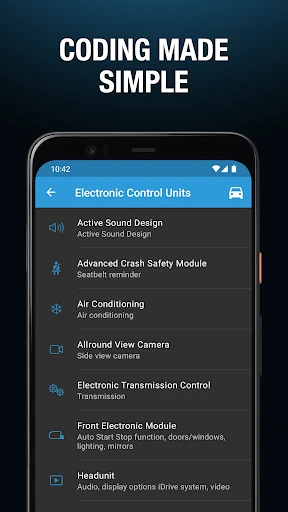
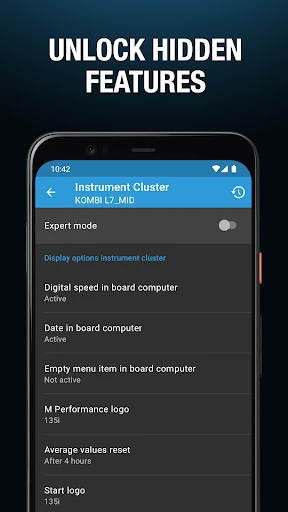

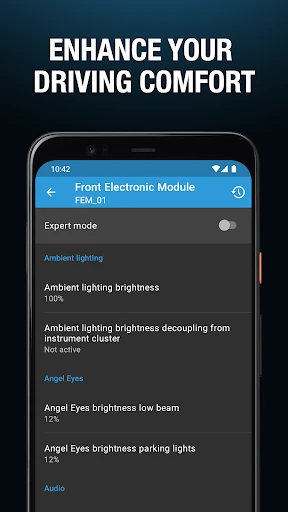

Transform Your BMW or MINI with BimmerCode
If you're a proud BMW or MINI owner who loves personalizing your car, the BimmerCode app is the perfect tool for you. Think of it as a magic wand for your car's electronics, unlocking a whole new world of customizations directly from your smartphone. Let me walk you through my experience with this handy app.
A World of Customization Awaits
First, let's cover what BimmerCode can do. Imagine changing how your lights work, adjusting your horn's sound, or turning off that automatic start-stop feature for good. All this and more is possible! The app connects to your car using a simple OBD2 adapter. Just plug the adapter into your car's diagnostic port, pair it with your phone via Bluetooth, and you're all set to start customizing.
Easy Setup and Getting Started
Downloading and setting up the app was super simple. You can get it on the Google Play Store or Apple App Store. Once it's installed, the interface is clean and easy to navigate, even if you're not super tech-savvy. The main screen shows different modules, each linked to a part of your car you can tweak. It's like a candy store for anyone who loves cars!
Explore a Myriad of Features
One of the coolest things about BimmerCode is its coding power. You can access and change settings that aren't available in your car's standard menu. Want your side mirrors to fold automatically when you lock the doors? Or to see a digital speedometer on your display? The app lets you do all this with just a few taps. Personalizing your car has never been easier.
Another great feature is the ability to save your settings. This means you can try out different configurations and always go back to a previous one if you want. It’s a safe way to experiment without worrying about making permanent changes.
Safety and Helpful Support
You might be wondering, "Is it safe to change my car's settings?" The app's developers have made sure the coding process is safe and that you can always undo your changes. There's also a helpful support section inside the app with guides and FAQs to help you if you run into any issues. The user community forums are another excellent resource for tips and advice from other BMW and MINI owners.
The app gets regular updates, too, adding new features and making sure it works with the latest car models and phone operating systems. It's good to know the developers are constantly working to improve the app.
Wrapping It Up
To sum it up, if you want to add a personal touch to your BMW or MINI, the BimmerCode app is a must-have. It's a powerful, user-friendly, and safe tool that opens up endless customization possibilities. Whether you're a car expert or just love cool tech gadgets, this app won't let you down. Go ahead, give it a try, and make your driving experience uniquely yours!
Advantages
- User-friendly interface for easy navigation.
- Supports a wide range of BMW and MINI models.
- Offers comprehensive coding options.
- Regular updates with new features.
- In-app guides for beginners.
Disadvantages
- Requires a stable internet connection.
- Limited free features available.
- May void car warranty if misused.
- Some advanced features need expertise.
- Not compatible with all OBD adapters.
Frequently Asked Questions
Q: What is BimmerCode and what does it do?
A: BimmerCode is an app designed for BMW and MINI car owners, allowing them to code and customize various features of their vehicles. With BimmerCode, users can personalize settings such as digital speed displays, lighting configurations, and more, without needing any technical expertise. The app provides an easy-to-use interface, making vehicle customization accessible to everyone.
Q: Is BimmerCode safe to use on my vehicle?
A: Yes, BimmerCode is safe to use. The app is developed with vehicle safety in mind, and as long as users follow the instructions carefully and don't make unsupported changes, there should be no issues. It's always recommended to back up your vehicle’s original settings before making any modifications to ensure you can revert changes if needed.
Q: Which vehicles are compatible with BimmerCode?
A: BimmerCode is compatible with a wide range of BMW and MINI models. However, compatibility can vary depending on the specific model and year of your vehicle. It is advisable to check the BimmerCode website or contact their support to confirm if your specific vehicle model is supported before purchasing or using the app.
Q: Do I need any additional equipment to use BimmerCode?
A: Yes, to use BimmerCode, you will need an OBD-II adapter, which connects your smartphone to your vehicle's onboard computer. The app supports various popular adapters like Vgate iCar Pro, OBDLink MX+, and others. Ensure you choose a compatible adapter for optimal performance and reliability when coding your car.
Q: Can I undo changes made using BimmerCode?
A: Yes, BimmerCode allows users to revert to the original settings if needed. It is highly recommended to back up your vehicle’s settings before making any changes. This backup can be used to restore your car to its original configuration, providing peace of mind and flexibility should you decide to reverse any modifications.
Technical Information
Recommended for You

Monster Maker

Ice Princess Makeup Salon

Esports Logo Maker

pixivコミック - みんなのマンガアプリ

Church Center App

Garmin Golf

Jobber: Field Service Software

PS Remote Play

LEGO® DUPLO® Disney

AR Drawing : Trace Anything

Chime – Mobile Banking

PredictionStrike: Sport Stocks

Bolt for Tesla - Tasker Plugin

Jacquie Lawson Advent Calendar

King James Bible (KJV)

Baby Monitor Saby - 3G Babycam

Grindr - Gay Dating & Chat

Radar GO-X: HUD, GPS, Maps

starryai - AI Art Generator

Sheetz Food Delivery & Rewards

Beauty Makeup Editor & Camera

EAGLE Security UNLIMITED

HamStudy.org
