
@Voice Aloud Reader (TTS)
Listen to articles books and documents anywhere
Screenshots
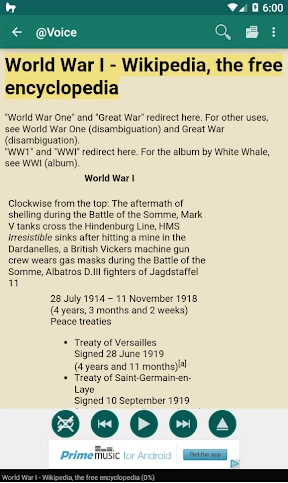

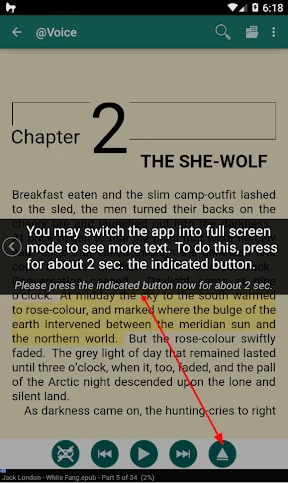


Give Your Eyes a Break: Meet @Voice Aloud Reader (TTS)
Have you ever wanted to give your eyes a rest and just listen to your favorite articles or e-books? Let me introduce you to @Voice Aloud Reader (TTS), an app designed to make reading more accessible and fun. I decided to try it out, and here's my experience.
What’s the Buzz About?
So, what is @Voice Aloud Reader (TTS) all about? Essentially, it's like a personal reading assistant that reads text out loud from any app that lets you share text or web links. This includes stuff from your web browser, news stories, emails, and even PDF documents. It feels like having a buddy read to you, and honestly, it's a pretty neat concept.
Getting Started
Getting the app up and running is super simple. After you install it, you get to pick from a bunch of different voices and languages. I was really surprised by the variety of voice choices available. You can pick a voice that's calm and relaxing or one that's more energetic. It also works with many languages, which is awesome for people who speak languages other than English.
The app's layout is straightforward and easy to use. You don't need to be a tech expert to figure it out. Just find the text you want to hear, send it to the app, and it starts reading for you.
Features Galore
One of the best things about this app is how it can read text from other apps on your phone. You can send text directly from your internet browser, email app, or document viewer straight into @Voice Aloud Reader (TTS). It works smoothly and is really handy.
You can also change how fast the app reads. This is perfect if you want the reading to be slower and clearer or faster to get through information quickly. The app even highlights the words as it reads them, so you can read along if you like. And if you like doing more than one thing at a time, you'll love that it can keep reading even when you switch to other apps or lock your phone.
My Personal Take
I thought the app was really helpful, particularly when my eyes were tired from looking at screens all day. It's ideal for long articles or for times when you're moving around and can't sit to read. Being able to change the voice and the reading speed makes it feel more tailored to you.
That said, it's not flawless. Sometimes the app had a little trouble with complicated layouts or very technical words, but it wasn't a major issue. Also, the free version includes ads, which can be a minor annoyance. But that's typical for free apps, and you can always upgrade to remove them if they bother you.
All in all, @Voice Aloud Reader (TTS) is a clever and useful app to have, especially if you want more flexibility in how you 'read'. Whether you're traveling, working out, or just relaxing, this app allows you to enjoy your content without using your hands or straining your eyes.
Advantages
- Supports multiple file formats.
- Customizable reading settings.
- Syncs with cloud services.
- User-friendly interface.
- Offline functionality.
Disadvantages
- Limited voices available.
- Occasional pronunciation errors.
- Ads in free version.
- Battery consumption high.
- May lag with large files.
Frequently Asked Questions
Q: What is @Voice Aloud Reader (TTS) and how does it work?
A: @Voice Aloud Reader (TTS) is an app designed to read aloud the text displayed on your smartphone. It uses Text-to-Speech (TTS) technology to convert written text into spoken words. You can use it to listen to web pages, news articles, emails, or any text documents. Simply open the document, and the app will read it aloud to you, allowing you to multitask or rest your eyes.
Q: Can @Voice Aloud Reader (TTS) read in different languages and voices?
A: Yes, @Voice Aloud Reader (TTS) supports multiple languages and a variety of voices, depending on the TTS engine installed on your device. You can customize the reading voice, speed, and volume. The app also allows users to download additional language packs and voices, ensuring that it can meet diverse language needs and preferences.
Q: Is @Voice Aloud Reader (TTS) compatible with all text formats?
A: @Voice Aloud Reader (TTS) is highly versatile and supports a wide range of text formats, including PDF, DOC, TXT, HTML, and more. This compatibility ensures that users can listen to almost any document type without needing to convert files. The app also integrates well with other apps, allowing seamless text sharing for reading aloud.
Q: Does @Voice Aloud Reader (TTS) require an internet connection to function?
A: While some features of @Voice Aloud Reader (TTS) may require an internet connection, such as downloading additional voices or language packs, the core functionality of reading text aloud can be done offline. This means you can enjoy listening to your documents even when you are not connected to the internet.
Q: Are there any accessibility features in @Voice Aloud Reader (TTS) for visually impaired users?
A: @Voice Aloud Reader (TTS) is designed with accessibility in mind, making it a valuable tool for visually impaired users. It offers easy navigation with voice commands and screen reader support, ensuring that users with visual challenges can easily access and control the app. Its TTS capabilities help bring written content to life for those who have difficulty reading traditional text.
Technical Information
Recommended for You

JCPenney – Shopping & Deals

BitTorrent®- Torrent Downloads

Yoti - your digital identity

Udemy - Online Courses

Manta: Comics & Graphic Novels

Sofascore: Live Sports Scores

Color Call Theme, Call Screen

Immobiliare.it - Indomio

EMT PASS- NEW

Babyname

LightInTheBox Online Shopping

Pawp: 24/7 Vet & Pet Care

ATOM Store, Myanmar

LiveHealth Online Mobile

World of Hyatt

Circuit Color

Smith's

Easy Piano Learning App

Pixlr AI Photo Editor

AI Video Maker: Photo & Music

Simply Piano: Learn Piano Fast

FreeTone Calls & Texting

GOAT – Sneakers & Apparel
