
Google Chat
Secure team messaging for work collaboration
Screenshots
My Recent Experience with Google Chat
A Fresh Take on Messaging
Let me tell you about my recent experience with Google Chat, Google's messaging platform designed to streamline communication and collaboration. Whether you’re connecting with colleagues or catching up with friends, this app offers a solid set of features that work well for both professional and personal needs.
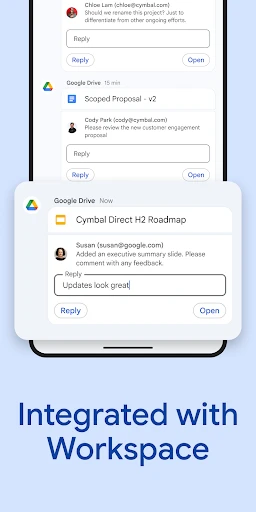
Google Chat is not just another messaging app; it's a full-featured communication tool. The app works smoothly with Google Workspace, making it a great fit for anyone who already uses Google's other services. From sending quick messages to sharing files directly from Google Drive, Google Chat makes staying in touch a breeze.
Noteworthy Features
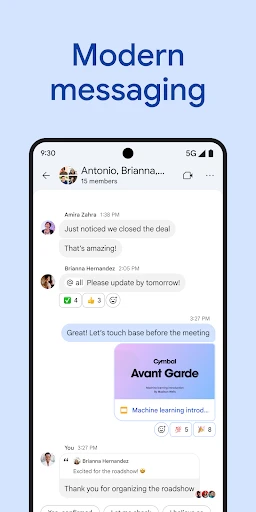
One of the best features is the ability to create rooms (now called "spaces") for different projects or groups. This helps users keep conversations tidy and on-topic. Each space can have multiple threads, so you won’t lose important talks in a sea of messages. It's a real help for project managers and teams handling several discussions at once.
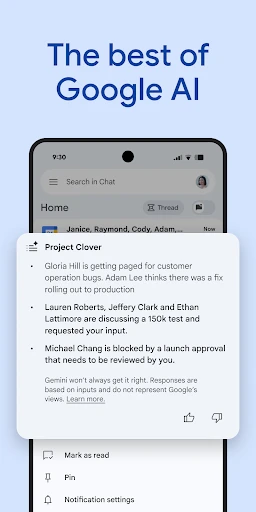
Another great feature is the app's link with Google Meet. With one click, you can jump from a chat to a video call, which is super useful for remote teams. Also, the smart reply feature, which suggests answers based on the chat's context, adds a layer of ease that's hard to beat.
A User-Friendly Design
The look of Google Chat is clean and straightforward. If you’ve used any Google products before, you’ll know your way around. Its simple design makes sure users can move through the app without getting lost. On top of that, the app offers both dark and light modes, suiting different visual tastes and keeping things comfortable during long chats.
Notifications are another strong point. You can adjust them a lot, letting you quiet certain chats or set priority alerts for key contacts. This control helps you stay in the loop without being overwhelmed by constant pings.
Wrapping It Up
All in all, Google Chat stands out as a dependable and effective messaging platform. Whether you’re running a team or organizing a get-together, the app gives you the right tools to make communication smoother. Its connection with Google Workspace is especially helpful for people who use Google's tools a lot. While it might not have the playful vibe of apps like WhatsApp or Messenger, its strength in productivity and teamwork is where it really wins.
If you’re in the market for a messaging app that mixes ease of use with useful features, Google Chat is certainly worth a look. It’s a tool that aims to improve how you communicate, making your chats more orderly and productive.
Advantages
- Integrates smoothly with Google Workspace.
- Supports threaded conversations for clarity.
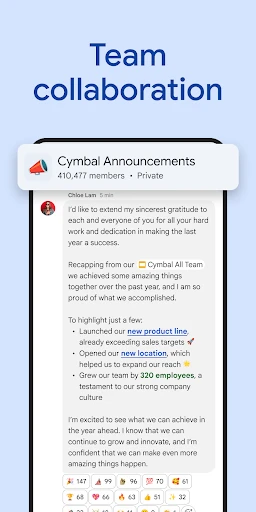
- Real-time collaboration with team members.
- Cross-platform availability via web and app.
- Secure with end-to-end encryption.
Disadvantages
- Limited third-party integrations.
- Notifications can be overwhelming.
- Interface lacks customization options.
- Requires Google account to use.
- Video call features are basic.
Frequently Asked Questions
Q: What is Google Chat and how does it differ from other messaging apps?
A: Google Chat is a communication service developed by Google that facilitates direct messaging and group conversations. Unlike other messaging apps, Google Chat integrates seamlessly with Google Workspace, allowing users to collaborate efficiently with features such as file sharing through Google Drive, real-time document editing in Google Docs, and integration with Google Meet for video calls. This makes it an ideal choice for businesses and organizations that rely on Google services.
Q: Is Google Chat free to use, and what are the available plans?
A: Google Chat is free for personal use if you have a Google account, offering basic chat functionalities. However, it is also part of Google Workspace, which offers additional features for businesses and enterprises. The Google Workspace plans, which include Google Chat, vary in pricing and features, so users can choose a plan that best suits their needs, ranging from basic communication tools to comprehensive business solutions.
Q: How secure is Google Chat in terms of privacy and data protection?
A: Google Chat offers strong security and privacy features, including encryption for data in transit and at rest. Google adheres to stringent security standards to protect user data. However, users should be aware that as a Google product, their data may be subject to Google's data handling policies, which can include data collection for service improvement and advertising purposes. It's advisable to review Google's privacy policy to understand how your data is managed.
Q: Can I integrate Google Chat with other applications and services?
A: Yes, Google Chat offers extensive integration capabilities with a wide range of applications and services. Users can connect Google Chat with other Google Workspace apps like Google Calendar, Drive, and Meet. Additionally, it supports integration with third-party apps through bots and APIs, enabling users to streamline workflows and enhance productivity by accessing various tools and services directly from the chat interface.
Q: What platforms and devices support Google Chat?
A: Google Chat is a versatile application that supports a wide array of platforms and devices. Users can access Google Chat on web browsers, Android phones, and iOS devices, as well as on desktops through dedicated apps. This cross-platform availability ensures that users can stay connected and collaborate with their teams seamlessly, regardless of their device or operating system, making it a flexible solution for both personal and professional communication.
Technical Information
Recommended for You

Photo Video Maker - InSlide

Rakuten Viber Messenger

PDF Reader - Viewer & Editor

AdaptedMind Math

Билеты ПДД 2025 и Экзамен ПДД

iNaturalist

Portable WiFi - Mobile Hotspot

Cabify

Clapper: Video, Live, Chat

Tilla Premium

Video to MP3 - Video to Audio

Huntington Mobile Banking

Football Chairman Pro 2

Protection 360™

Poppo Live- Live Stream

Ancestry: Family History & DNA

Carly — OBD2 car scanner

Sticker.ly - Sticker Maker

RxSaver – Prescription Coupons

Spin Wheel: Random Selection

Hi Weather Launcher-Live Radar

Yelp for Business

Facetune: Hair, Photo Editor
