
Samsung Internet Browser
Fast secure browsing for Samsung device users
Screenshots


Exploring the Samsung Internet Browser: A Refreshing Alternative
Ever feel like you're just using the same web browsers as everyone else and want to try something different, but still just as good? Let me tell you about the Samsung Internet Browser, a really handy web browser that's been getting more popular. No problem if you haven't come across it yet; think of it as a cool discovery in a tech scene usually ruled by Chrome and Safari.
First Impressions and User-Friendly Design
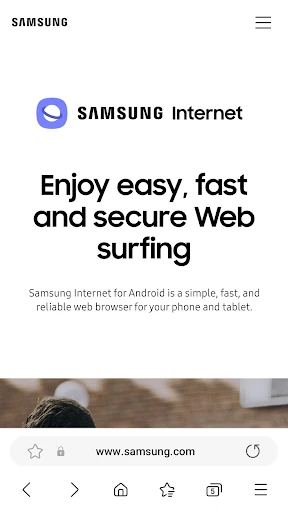
Right after I installed the Samsung Internet Browser, I liked its neat and easy-to-understand layout. It feels like walking into a tidy room where you can find whatever you need right away. The look is modern and doesn't overwhelm you with too many icons or menus. It's clear that the people who made it really thought about making it simple to use, which is great for someone like me who prefers a no-fuss experience.
Noteworthy Features for a Better Experience
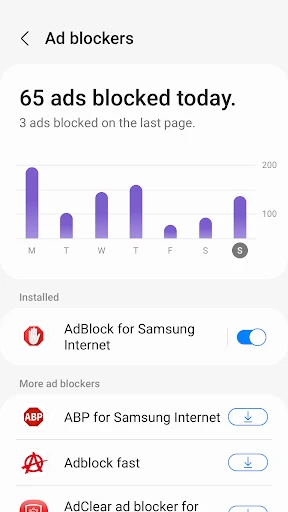
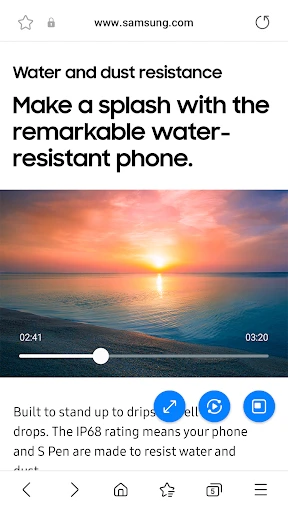
One of the best things I noticed straight away was the built-in ad-blocker. Everyone knows how irritating those pop-up ads can be, and this browser really deals with that problem. Surfing the web without constant distractions? Absolutely! It also works with add-ons, so you can set up your browsing just how you want it. I really liked the Video Assistant tool, which makes watching videos smoother and turns online marathon sessions into something really easy.
There's also a Secret Mode, which is like the private browsing in other browsers, but it feels a bit more polished. It lets you surf the web without saving your history, which is ideal for when you want to keep your online business to yourself.
Speed and Dependability in Action
How fast a browser works is super important, and the Samsung Internet Browser is great in this area. It's snappy, reacts quickly, and manages lots of open tabs without any trouble. I've had tons of tabs open at once while looking things up and never had it slow down or stop working. This kind of steadiness makes it an excellent choice for everyday tasks, whether for your job, schoolwork, or just casual internet use.
Availability and User-Focused Options
You might be thinking, is this only for people with Samsung phones? Not at all! While it works best on Samsung gadgets, you can get it on any Android device, which means many more people can use it. It also comes with a Dark Mode, which is awesome for reading in the dark, helping to prevent eye tiredness and saving your phone's battery life.
Wrapping Up: Is It For You?
In an online world run by just a few major browsers, the Samsung Internet Browser is a really nice change. It's flexible, trustworthy, and full of useful features that make going online not only productive but also pleasant. Whether you love technology and want to try the latest thing or you're just a regular user who wants something straightforward and capable, this browser is definitely worth a try. So, how about switching things up and giving it a go? You might end up with a new go-to browser
Advantages
- Fast and efficient browsing experience.
- User-friendly interface with easy navigation.
- Advanced privacy and security features.
- Offline reading mode available.
- Supports extensions and add-ons.
Disadvantages
- Limited availability on non-Samsung devices.
- Occasional compatibility issues with websites.
- Pre-installed on Samsung devices
- non-removable.
- Consumes more battery than some competitors.
Frequently Asked Questions
Q: What features make Samsung Internet Browser stand out from other browsers?
A: Samsung Internet Browser offers a unique set of features that distinguish it from other browsers. It has a sleek and user-friendly interface, supports extensions, and includes a built-in ad blocker to enhance browsing speed and security. The browser also prioritizes privacy with its Secret Mode, which allows users to browse without leaving a trace. Additionally, it offers a customizable homepage and supports a variety of web standards, making it versatile for various content types.
Q: Is Samsung Internet Browser compatible with non-Samsung devices?
A: Yes, Samsung Internet Browser is compatible with non-Samsung devices. It is available for download on both Android and iOS platforms, allowing users with different smartphone brands to enjoy its features. This cross-device compatibility ensures a broader user base can benefit from its security features, fast browsing performance, and customizable options. Users can download the app from the Google Play Store or Apple App Store accordingly.
Q: How does Samsung Internet Browser ensure user privacy and security?
A: Samsung Internet Browser places a strong emphasis on user privacy and security. It incorporates features like Secret Mode, which keeps your browsing history private and secure. Additionally, the browser includes a robust anti-tracking mechanism and a built-in ad blocker to prevent unwanted tracking and advertisements. Samsung's commitment to security is evident in its regular updates and patches that protect users against potential vulnerabilities and threats.
Q: Can I sync my data across devices using Samsung Internet Browser?
A: Yes, Samsung Internet Browser allows you to sync your data across devices seamlessly. By signing into your Samsung account, you can synchronize bookmarks, saved pages, and other browser settings across different devices. This feature ensures that your browsing experience is consistent and personalized, whether you're using a smartphone, tablet, or any other compatible device. It enhances convenience for users who frequently switch between devices.
Q: What customization options does Samsung Internet Browser offer?
A: Samsung Internet Browser provides a variety of customization options, allowing users to tailor their browsing experience to their preferences. You can customize the toolbar layout, choose from various themes, and adjust font sizes for readability. The browser also supports a range of extensions for added functionality. These customization options enable users to create a browsing environment that suits their individual needs, enhancing overall usability and satisfaction.
Technical Information
Recommended for You

Plant Parent: Plant Care Guide

Link Messenger

BabyCam - Baby Monitor Camera

Yesway & Allsup’s Rewards

Postmates - Food Delivery

WNBA - Live Games & Scores

Inkitt: Books, Novels, Stories

Solo: Your Gig Business App

Blazing: Ignite Your Love Life

Rakuten: Cash Back and Deals

Culver's

Microsoft Designer

DJ Music mixer - DJ Mix Studio

Lingual Coach: Learn with AI

NextLog

FacePic Face Editor, Hair, Age

DODO - Live Video Chat

Dreame-Read Romance Stories

Goods Unite Us

STARZ

ComicScreen - PDF, ComicReader

FourKites CarrierLink App

Security Craft Mod Minecraft
