
Remote Control for Roku TV
Roku remote control for your smartphone
Screenshots

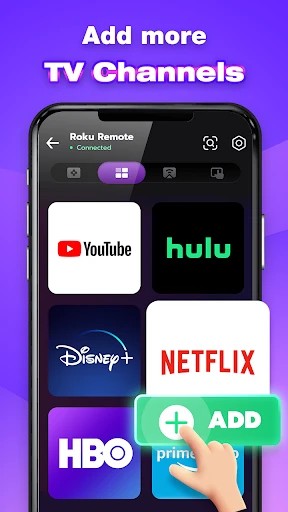


Remote Control for Roku TV: Your TV's Magic Wand
If you've ever found yourself tangled in a web of remote controls, each with its own set of buttons and quirks, you'll understand the sheer joy that an app like Remote Control for Roku TV brings. This nifty little app turns your smartphone into a universal remote for your Roku TV, allowing you to control everything from volume to channel selection without the need for a physical remote. It's like having a magic wand, but for your TV.
Getting Started is a Breeze
Getting started with the Remote Control for Roku TV app is a breeze. Once you download it from the App Store or Google Play, the app guides you through a straightforward setup process. You just need to ensure your Roku TV and your smartphone are connected to the same Wi-Fi network. The app automatically detects your Roku device, and voilà, you're ready to go. No fumbling through manuals or complex installations—just plain simplicity.
A Look at the Layout and Handy Tools
The app's user interface is designed with the user in mind. It's clean, intuitive, and mirrors the layout of a real Roku remote. The main screen features all the buttons you'd expect—home, back, play/pause, and even a nifty keyboard for typing searches faster than you can say "Roku." The touchpad feature is a game changer, allowing you to swipe and navigate your TV screen with ease. It’s like the app developers knew exactly what we wanted and delivered it on a silver platter.
One feature I particularly love is the voice command option. Simply tap the microphone icon and speak your request. It's perfect for those moments when you're too cozy on the couch to type out "Find action movies." The app also supports private listening, which lets you stream audio through your phone's headphones, ensuring you don't disturb the rest of the house during your late-night binge sessions.
How Well Does It Really Work?
In terms of performance, the Remote Control for Roku TV app is rock solid. It’s responsive, with minimal lag between your command and the TV's response. This reliability is crucial, especially when you're in the middle of an intense movie scene and can't afford any hiccups. The app rarely crashes, and updates are rolled out regularly to iron out any minor bugs, ensuring it remains as smooth as butter.
Battery usage is surprisingly efficient, so you don’t have to worry about the app draining your phone’s battery life. It’s optimized to work seamlessly in the background, letting you switch between apps without losing connection to your Roku TV.
Wrapping It All Up
All in all, the Remote Control for Roku TV app is a must-have for any Roku TV owner. It's more than just a convenience; it’s a smart, reliable solution to managing your TV viewing experience. Whether you've misplaced your physical remote or just prefer the ease of controlling your TV from your phone, this app has got you covered. So go ahead, give it a try, and embrace the future of TV remote control. You might just find yourself wondering how you ever lived without it.
Advantages
- Easy to set up and connect with Roku devices.
- Intuitive interface for seamless navigation.
- Supports voice commands for hands-free control.
- Customizable remote layout to suit user needs.
- Compatible with both Android and iOS devices.
Disadvantages
- Requires stable internet connection.
- Some features locked behind a paywall.
- Occasional lag in command response.
- Limited compatibility with older Roku models.
- Ads can be intrusive at times.
Frequently Asked Questions
Q: What is Remote Control for Roku TV and how does it work?
A: Remote Control for Roku TV is a mobile application designed to transform your smartphone into a fully functional remote control for Roku TVs. Once downloaded, the app connects to your Roku TV via Wi-Fi, allowing you to navigate, play, pause, and control settings without the need for a physical remote. It's essential to ensure your mobile device and Roku TV are connected to the same Wi-Fi network for optimal performance.
Q: Is Remote Control for Roku TV compatible with all Roku TV models?
A: The Remote Control for Roku TV app is compatible with most Roku TV models. However, compatibility might vary depending on the specific version of Roku TV you own. Before downloading, it is advisable to check the app's description or the developer's website for a list of supported devices to ensure your TV model is compatible with the app.
Q: Are there any costs associated with using Remote Control for Roku TV?
A: Remote Control for Roku TV is generally free to download and use, offering basic functionalities without any charges. However, there might be in-app purchases or premium features available that require payment. These might include advanced controls or ad-free experiences. It's recommended to review the app's pricing details within the app store to understand any potential costs involved.
Q: What features does Remote Control for Roku TV offer?
A: The app provides a wide range of features, including the ability to change channels, adjust volume, and browse through apps installed on your Roku TV. Additionally, it often includes a virtual keyboard for easier text input, voice command capabilities, and a user-friendly interface that mimics a traditional remote. Some versions may also offer customizable button layouts and quick access to favorite channels.
Q: How do I troubleshoot connectivity issues with Remote Control for Roku TV?
A: If you're experiencing connectivity issues with the Remote Control for Roku TV app, first ensure that both your mobile device and Roku TV are connected to the same Wi-Fi network. If problems persist, restarting both devices can often resolve the issue. Additionally, checking for updates for both the app and your Roku TV software may help. For persistent issues, consulting the app's support page or contacting customer service is recommended.
Technical Information
Recommended for You

Uber Eats Orders

PayByPhone

StayFree - Screen Time

X Video Downloader & Player

Breeze Airways

PDF Reader Pro - PDF Editor

TheFork - Restaurant bookings

weather24: Forecast & Radar

Perfect Viewer

Wyze - Make Your Home Smarter

Advent Magnificat 2024

All-in-one Calculator Launcher

Solid Starts: Baby Food App

NeuroNation - Brain Training

Photoroom AI Photo Editor

Floor Plan Creator Home Design

Mobile Number Locator App

PAW Patrol Academy

Alaska Airlines - Travel

Scratch

Bose Connect

Caller Name Announcer

Microsoft Word: Edit Documents
