
FordPass™
FordPass Connect Your Ford Vehicle Anywhere
Screenshots



Revving Up with FordPass™: A Digital Companion for Your Drive
Getting Your FordPass App Up and Running
First things first, downloading FordPass™ is a breeze. Available on both Android and iOS, it’s as simple as hitting that download button and letting the app do its magic. Once installed, you’re greeted with a sleek interface that’s both intuitive and easy to navigate. No tech whiz needed here!
Cool Tools and Handy Features to Explore
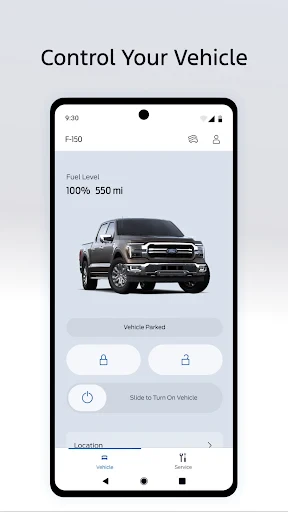
Now, let’s dive into what makes FordPass™ stand out. One of the coolest features is the ability to remote start your vehicle. Yup, you read that right! On a chilly morning, you can start your car from the comfort of your home, say goodbye to sitting in an icebox. Plus, the app lets you lock and unlock your car remotely. Forget where you parked? No worries, the app’s got your back with the vehicle locator feature.
FordPass™ also keeps you in the loop with real-time updates on fuel levels and oil life. It’s like having a personal mechanic in your pocket ensuring everything’s running smoothly. And if you’re hitting the road, the app provides navigation assistance with traffic updates to steer you clear of any jams.
Your Car and Your Life, All Connected
In today’s connected world, staying in sync with your vehicle is a game changer. FordPass™ offers seamless integration with Ford SYNC® technology, allowing you to stream your favorite tunes, make calls, and even send texts without taking your eyes off the road. Safety first, folks!
And let’s not forget the FordPass Rewards. Every mile counts, and as you drive, you earn points that can be redeemed for maintenance services or even a new ride. Who doesn’t love rewards?
Wrapping Up Our Tour of FordPass
To wrap it up, FordPass™ isn’t just an app; it’s like a digital Swiss Army knife for Ford owners. Whether it’s simplifying your daily routine or enhancing your driving experience, this app has something for everyone. Sure, it might take a bit of getting used to, but once you’re in the groove, it’s hard to imagine driving without it. So, if you’re a Ford enthusiast or just someone who loves convenience, give FordPass™ a spin. It might just be your new favorite driving companion.
Happy driving
Advantages
- User-friendly interface
- Remote vehicle control features
- Vehicle health alerts
- Integrated payment options
- Enhanced security features
Disadvantages
- Limited functionality without Ford vehicle
- Occasional connectivity issues
- Subscription required for premium features
- Data privacy concerns
- Complex initial setup
Frequently Asked Questions
Q: What is FordPass™ and what features does it offer?
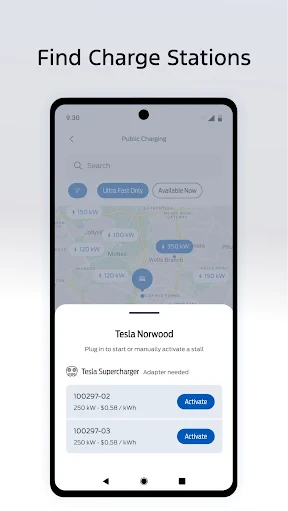
A: FordPass™ is a mobile app designed to enhance your driving experience with Ford vehicles. It offers features such as remote start, lock and unlock, vehicle location tracking, and integration with FordPass Rewards. Additionally, it provides maintenance alerts and scheduling, roadside assistance, and fuel price comparisons. This comprehensive tool aims to provide convenience and connectivity to Ford owners.
Q: Is FordPass™ compatible with all Ford vehicles?
A: FordPass™ is compatible with most Ford vehicles manufactured after 2017. However, the availability of specific features may vary depending on the model and year of your vehicle. To ensure full compatibility and functionality, it's recommended to check the FordPass™ website or consult with a Ford dealership to confirm whether your vehicle supports the app features you need.
Q: How does FordPass™ enhance vehicle security?
A: FordPass™ enhances vehicle security by allowing users to remotely lock and unlock their vehicles through the app. The app also provides alerts if the alarm is triggered, offering peace of mind when you are away from your car. Additionally, the vehicle location feature helps you keep track of your car's whereabouts, adding an extra layer of security.
Q: Are there any costs associated with using FordPass™?
A: FordPass™ is free to download and use, but some features may require a subscription or be dependent on a connected vehicle service. For instance, certain remote features and data services may incur additional costs. It's advisable to review the app's terms and conditions or consult with Ford customer service for detailed information on any potential charges.
Q: How can I troubleshoot issues with the FordPass™ app?
A: If you're experiencing issues with the FordPass™ app, first ensure that your app is updated to the latest version. Check your internet connection and restart your phone. If problems persist, consult the in-app help section or visit the FordPass™ support page. For further assistance, contacting Ford customer service can provide more tailored support.
Technical Information
Recommended for You

Remote Control App For All TVs

Whova - Event & Conference App

Future Face - See Your Future

Gospel Library

Weezer-Lite, MP3 Music player

Heart Camera

Vrbo Vacation Rentals

ParlayPlay Fantasy Sports Game

10bii Financial Calculator

Premium Parking

OS Launcher 18 - Phone 16 Max

YouCam Video Editor & Retouch

AAA Mobile

MobiOffice: Word, Sheets, PDF

AI Baby Generator: Face Maker

Talk to me Slimy: Talking Pet

Abyss Reader

Dashtoon: Comics & Manga

Mondly: Learn 41 Languages

starryai - AI Art Generator

Keyboard Maker: Keyboard Theme

زخرفة الكتابة بكل انواع الخطوط

Listen AI: Text to Speech
