
MapXplorer: Navigation, Radar
Live Map Traffic Alerts Speed Traps Police
Screenshots


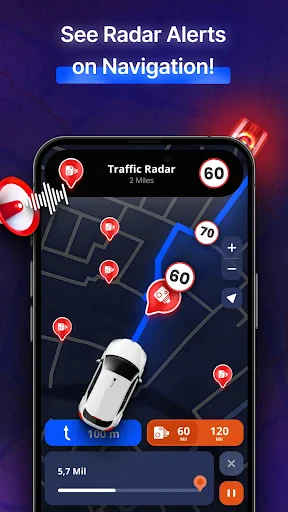


MapXplorer: Navigation, Radar
In the vast sea of navigation apps available today, MapXplorer: Navigation, Radar stands out like a beacon for those of us who often find ourselves wandering off the beaten path. I recently took it for a spin, and let me tell you, it was quite the experience!
From the moment you open up MapXplorer: Navigation, Radar, you're met with a screen that's both easy on the eyes and a breeze to use. It finds where you are in a flash, and you're all set to go. Whether you're planning a big road trip or just need to find the closest gas station, this app has your back.
One of the coolest things about this app is definitely the radar. This isn't just your run-of-the-mill map program. The radar gives you a live look at what's happening around you, offering a constantly updating picture of your environment. It's like having an extra sense that tells you about interesting spots nearby, how bad the traffic is, and even possible dangers up ahead.
Plus, the ability to use maps when you're offline is a total lifesaver. We've all been there—stuck out in the boonies with no cell service and a useless navigation app. With MapXplorer, you can save maps to your phone before you head out, so you'll never be stuck without guidance again. It sounds simple, but it completely changes the game.
For actually getting you from point A to point B, this app is spot on. The spoken directions are accurate and the voice that guides you is clear and easy to understand. I've tried it in busy cities and on quiet backroads, and it's always gotten me where I needed to go.
Another feature I really came to rely on was the live traffic reports. Getting updates in real-time helps you dodge traffic snarls and find the fastest path. It feels like you've got a co-pilot who's always looking out for the best way to go, saving you from those frustrating delays.
So, what really sets MapXplorer apart from all the other apps out there? It's the way it packs so many useful features into a design that just makes sense. The whole app feels like it was built with your needs in mind, giving you tools and info that actually make driving better.
I'm also a fan of the small touches, like how you can change the look of the screen. You can adjust the settings to get exactly what you want, whether you like a simple, clean view or one that shows you every bit of data. It's all about making your trip as smooth and pleasant as it can be.
In conclusion, if you're in the market for a reliable, feature-rich navigation app, give MapXplorer a try. Its radar feature alone makes it worth the download, but the overall experience is what will keep you coming back. Safe travels, and happy exploring
Advantages
- Highly accurate GPS navigation.
- User-friendly interface.
- Wide range of map overlays.
- Real-time traffic updates.
- Offline mode available.
Disadvantages
- Consumes significant battery power.
- Occasional map loading delays.
- Limited customization options.
- Premium features require subscription.
- Some ads in free version.
Frequently Asked Questions
Q: What is MapXplorer: Navigation, Radar and its main purpose?
A: MapXplorer: Navigation, Radar is a comprehensive app designed to enhance your navigation experience. It integrates advanced radar features with traditional map navigation, allowing users to explore unfamiliar areas with confidence. Whether you're traveling by foot, car, or bike, the app provides real-time updates, ensuring accurate directions and a seamless journey. Its intuitive interface makes it accessible for all types of users.
Q: How can MapXplorer improve my daily commute?
A: MapXplorer is equipped with live traffic updates, route optimization, and radar detection for speed cameras and road hazards. These features help in reducing travel time and avoiding congested routes. The app also offers voice-guided navigation, which allows for hands-free operation, making your daily commute more efficient and safe. By using MapXplorer, you can plan your routes better and arrive at your destinations on time.
Q: Is MapXplorer: Navigation, Radar available offline?
A: Yes, MapXplorer offers offline map capabilities, which is a lifesaver for users traveling in areas with limited or no internet connectivity. You can download maps for your desired regions, and the app will provide navigation services without needing an active data connection. This feature ensures that you remain on track, even in remote locations where GPS signals may be weak.
Q: What devices are compatible with MapXplorer: Navigation, Radar?
A: MapXplorer is compatible with both Android and iOS devices, covering a wide range of smartphones and tablets. The app is designed to function optimally across different screen sizes and resolutions, ensuring a uniform user experience. Always check for the latest updates and ensure your device's operating system is up-to-date for the best performance.
Q: Are there any subscription fees or in-app purchases in MapXplorer?
A: MapXplorer offers a free version with basic features, but for an enhanced experience, users can opt for in-app purchases or a subscription model. The premium version unlocks additional features such as ad-free usage, advanced radar capabilities, and exclusive map updates. Users can choose the plan that best suits their needs, ensuring that they get the most value out of the app.
Technical Information
Recommended for You

CBS

Google Arts & Culture

Pregnancy App

iPhone Control Center iOS 16

Journal: Notes, Planner, PDFs

Cake Maker: Happy Birthday

Ancestry: Family History & DNA

IKEA

WhisperFM - Romance Novels

Alison: Online Education App

Yogiyo - Food Delivery

HaloVPN Pro: Fast VPN Proxy

WFP 339 Ultra watch face

NewsBreak Lite

SimpliSafe Home Security App

4K Wallpaper - HD Backgrounds

Captions Lite

CE5 Contact

TV Cast - Cast for Chromecast

PicFrame

AXS Tickets

Shazam: Find Music & Concerts

MoshUp
