
TouchTunes: Live Bar Jukebox
Play Music For Everyone In Bars
Screenshots
Exploring the World of TouchTunes: Play the Jukebox
Getting Set Up with the App
Hey there, music lovers! 🎶 If you’re anything like me, then you know the magic that a good tune can bring to any moment. Imagine being able to control the music at your local bar or diner, right from your phone! Well, that’s exactly what the TouchTunes app brings to the table. Let me walk you through my experience with this nifty little app that turns your smartphone into a jukebox remote control.
What the App Can Do For You
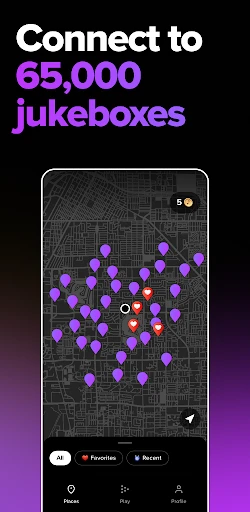
First things first, downloading and setting up the app was a breeze. Available for both Android and iOS, TouchTunes is super easy to find on the app stores. Once downloaded, the app guides you through a quick setup process. You’ll need to enable location services – don’t worry, it’s just so the app can find TouchTunes-enabled locations nearby. I was pleasantly surprised to discover a variety of bars and restaurants in my area that were already hooked up!
Navigating the App and Social Vibes
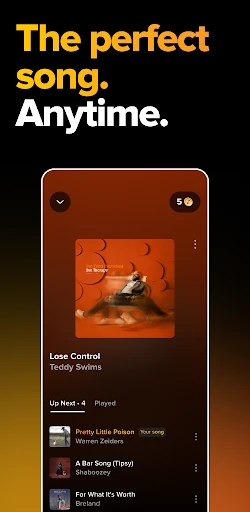
Here’s where things really get interesting. With TouchTunes, you can browse the music library at your favorite spot before you even step foot inside. The app lets you view the current playlist and queue up your selections so you can be the DJ of your night out. I loved how I could see what songs were trending at each location too. It’s like having insider info on the musical vibe before you even get there!
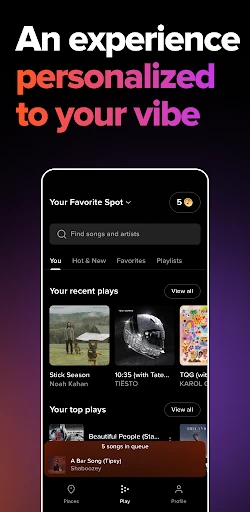
Another killer feature is the ability to create and save playlists. Got a favorite set of tracks? Save them on the app and load them up whenever you’re out at a TouchTunes location. This feature came in handy when I wanted to keep the party going with my favorite jams.
Wrapping It Up
Navigating through TouchTunes is a pretty seamless experience. The interface is clean and intuitive, making it easy for even the most tech-challenged folks to get their groove on. I appreciated the thoughtful design that didn’t overwhelm me with too many options or buttons. Plus, the transaction process for purchasing credits (used to play songs) was straightforward and secure.
There’s also a social aspect to the app. You can see who else is playing music at your location and even send them song suggestions! It’s a great way to connect with fellow music enthusiasts.
Overall, TouchTunes is a brilliant app for anyone who loves music and wants to have a say in what’s playing when they’re out and about. It’s like having a jukebox in your pocket, ready to unleash your favorite tracks at any moment. Whether you’re planning a night out with friends or just want to set the mood for a casual dinner, TouchTunes has got you covered.
So, next time you’re heading to your local hangout, why not give TouchTunes a spin? It might just become your new favorite app for making nights out even more memorable. 🎵
Advantages
- Vast music library available.
- User-friendly interface.
- Connects with multiple venues.
- Offers personalized playlists.
- Frequent updates and improvements.
Disadvantages
- Requires internet connection.
- In-app purchases can add up.
- Limited offline functionality.
- Advertisements can be intrusive.
- Compatibility issues on older devices.
Frequently Asked Questions
Q: What is TouchTunes: Play the Jukebox?
A: TouchTunes: Play the Jukebox is an interactive music application that allows users to play their favorite songs on digital jukeboxes located in various venues. By using the app, you can browse a wide selection of music, create playlists, and queue songs remotely, providing a modern twist to the traditional jukebox experience.
Q: How do I find a TouchTunes jukebox near me?
A: To locate a TouchTunes jukebox near you, simply open the app and use the 'Find Jukebox' feature. This tool uses your current location to display nearby venues with TouchTunes jukeboxes. You can also search by city or zip code to plan ahead if you're visiting a different area.
Q: Is there a cost associated with using the TouchTunes app?
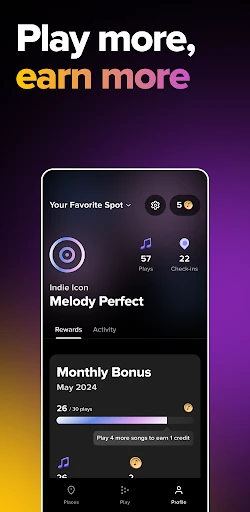
A: Yes, using the TouchTunes app involves purchasing credits to play songs on the jukebox. Prices for credits can vary depending on promotional offers or venue settings. The app offers various credit packages, allowing you to choose the amount that best suits your needs and enjoy your music selections seamlessly.
Q: Can I create and manage playlists with TouchTunes?
A: Absolutely! TouchTunes allows you to create and manage playlists directly from the app. You can add your favorite songs, organize them into playlists, and even share them with friends. This feature enhances your jukebox experience by letting you customize the music you want to hear whenever you visit a venue with TouchTunes.
Q: How does TouchTunes enhance the social experience at a venue?
A: TouchTunes enhances the social experience at venues by allowing users to engage with music in a communal setting. Patrons can collaboratively queue songs, create a lively atmosphere, and enjoy a shared musical experience. The app also connects users, enabling them to discover new music and interact with others who have similar tastes.
Technical Information
Recommended for You

Phonk Music - Song Remix Radio

AR Drawing Paint Sketch Trace

AI Interior Design Home Decor

Golf Pad: Golf GPS & Scorecard

The Guardian - Live World News

Blur Video and Photo Editor

LibreLinkUp

Image to PDF - PDF Maker

Moovit: Your Transit Tracker

Straight Arrow News

Songsterr Guitar Tabs & Chords

Slack

XShorts: short and hot videos

X PhotoKit

Vocal Image: AI Voice Coach

NordVPN – fast VPN for privacy

Telegram X

Invoice2go: Easy Invoice Maker

Duo Call - Dual Global Calling

Chatspin Random Video Chat Duo

Invitation Maker-Card Creator

FOX Sports: Watch Live Games

Islamic Songs & Nasheed 2025
