
FL STUDIO MOBILE
Powerful Mobile Music Production For Musicians
Screenshots
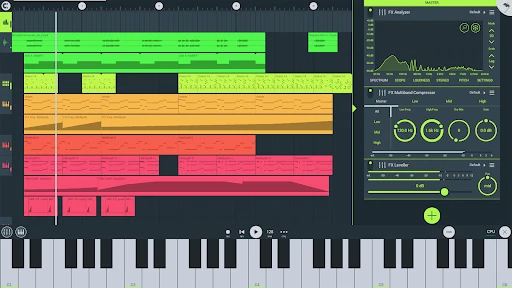
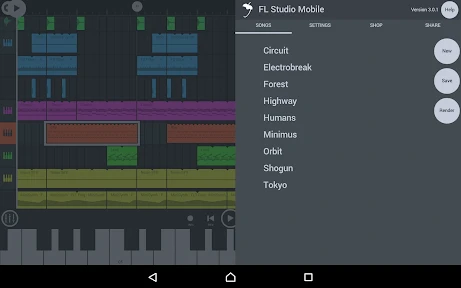
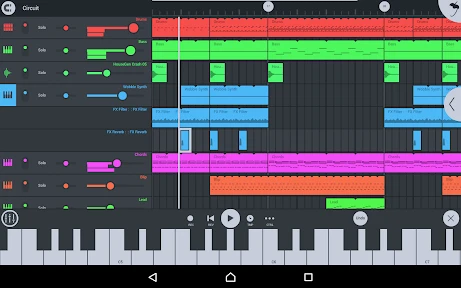
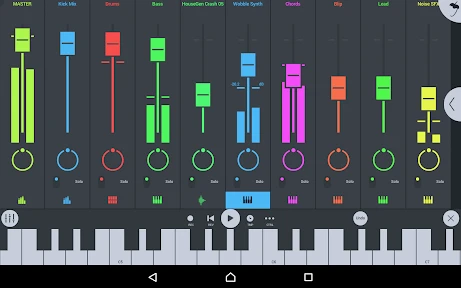
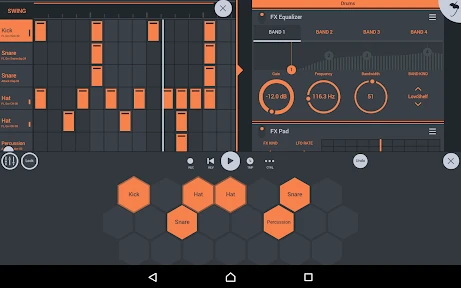
When it comes to music creation on the go, FL Studio Mobile is a name that resonates with both budding and experienced music producers. This app, available on both Android and iOS, transforms your mobile device into a full-fledged digital audio workstation (DAW). Let’s dive into what makes FL Studio Mobile a must-have for music enthusiasts and professionals alike.
Your First Look at the Mobile Studio
Upon opening the app, you'll find a clean and user-friendly layout. The team has done a great job of bringing the core FL Studio experience to a smaller screen. For anyone who's constantly traveling, having this much power in your pocket is a real advantage. Getting started is simple, so you can begin creating music right away without a complicated setup.
Key Tools and Capabilities
FL Studio Mobile is loaded with tools that are useful for both beginners and pros. A major highlight is the ability to edit multiple tracks at once. You can stack different sounds, instruments, and effects to build a complex and layered musical piece. The app includes a solid collection of synths, drum packs, and pre-sliced loops. And if you want more, you can always buy additional sounds from within the app.
Another great aspect is how well it works with the desktop FL Studio. You can begin a song on your phone and then easily move the project to your computer to add the finishing touches. This flexibility means you're never stuck on one device and can keep working wherever you are.
What It's Like to Use
In my time using it, I've found FL Studio Mobile to be very smooth. The touchscreen responds well, allowing for precise adjustments to settings and effects. It also works with external MIDI controllers, which is a big help for people who like using physical knobs and keys. It's not hard to learn, especially with the included sample projects and guides that walk you through the fundamentals.
Additionally, the app performs reliably. It runs without any stuttering or delay, even when you have a big project with lots of tracks and effects running. This dependability is important, whether you're performing live or just don't want your creative flow to be broken.
Wrapping Up the Review
To sum it up, FL Studio Mobile is a powerful application that puts professional music-making tools in the palm of your hand. No matter your skill level, this app has what you need. Its extensive features, easy connection with the desktop version, and straightforward design make it one of the best options for making music while you're out and about.
If your goal is to express your musical ideas at any time and in any place, then FL Studio Mobile is certainly a worthwhile purchase. It's more than just software; it's a complete production studio you can take with you, making sure you can develop your musical ideas whenever and wherever they come to you.
Advantages
- Professional-grade music production.
- Wide range of instruments and loops.
- Intuitive touch interface.
- Regular updates with new features.
- Cross-platform compatibility.
Disadvantages
- Paid app with in-app purchases.
- Steep learning curve for beginners.
- Limited free trial options.
- Requires substantial storage space.
- Occasional performance lags on older devices.
Frequently Asked Questions
Q: What is FL Studio Mobile, and what are its main features?
A: FL Studio Mobile is a powerful music production app available for both Android and iOS devices. It allows users to create, edit, and save complete multi-track music projects directly on their mobile devices. Key features include a high-quality synthesizer, drum kits, and sliced-loop beats. Users can also import and export MIDI files, and the app supports various audio formats, making it a versatile tool for both beginners and professional musicians.
Q: Is FL Studio Mobile suitable for beginners in music production?
A: Yes, FL Studio Mobile is suitable for beginners as well as experienced music producers. The app offers an intuitive interface with a range of tutorials and guides to help new users get started. While it provides a comprehensive set of professional tools, its user-friendly design ensures that even those new to music production can easily navigate and utilize its features.
Q: What are the system requirements for FL Studio Mobile?
A: FL Studio Mobile is compatible with both Android and iOS devices. For Android users, the app requires Android version 4.1 or higher, while iOS users need iOS 11.0 or later. It's important to have enough storage space as the app, along with additional sound packs and projects, can occupy significant space. A device with a good processor and RAM will ensure smooth operation.
Q: Can I use FL Studio Mobile on multiple devices?
A: Yes, you can use FL Studio Mobile on multiple devices. The app supports cross-platform synchronization, allowing users to work on their projects from different devices seamlessly. You can start a project on your smartphone and continue working on it from your tablet or even transfer projects to FL Studio's desktop version for further enhancement and mixing.
Q: Are there in-app purchases or subscriptions required in FL Studio Mobile?
A: FL Studio Mobile is a one-time purchase app, meaning you pay once to download and use it without ongoing subscription fees. However, there are optional in-app purchases available, such as additional sound packs and effects, which can enhance your music production capabilities. These purchases are not mandatory but can provide additional resources and tools for more advanced users.
Technical Information
Recommended for You

BitBible (Lockscreen, English)

Good Morning Wishes

myColorado

Comikey - Manga & Webcomics

GPS Satellite Map, Live Camera

Smart & Final

Go Fly Drone Remote Controller

Shipt: Order Grocery Delivery

Sweet Hearts Watch Face

Clubhouse

Shop: All your favorite brands

Opera GX: Gaming Browser

Jamba

Philo: Shows, Movies, Live TV.

FOX Weather: Daily Forecasts

eBay Motors: Parts, Cars, more

Uber Eats: Food Delivery

Tip Calculator

Niantic Campfire

ThinkDiag+

VITA - Video Editor & Maker

Cocktail Party: Drink Recipes

Body Temperature Fever Tracker
