
Docusign - Upload & Sign Docs
Sign Documents Securely Anywhere Anytime
Screenshots
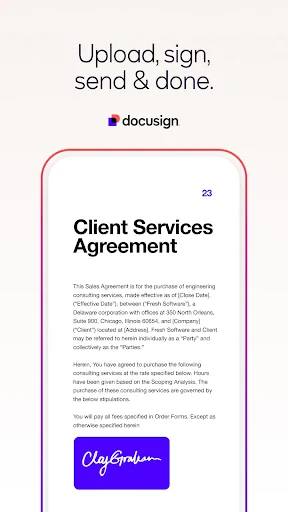
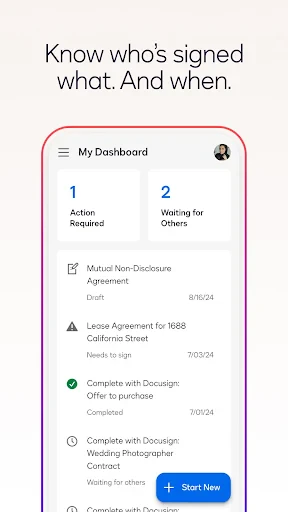

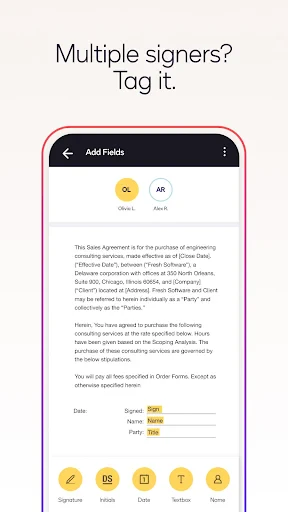
Let's dive into the world of digital signatures with DocuSign, an app that's becoming the go-to for signing documents on the fly. Whether you're a busy professional or someone who just hates the hassle of printing, signing, and scanning documents, DocuSign might just be your new best friend.
When I first opened the DocuSign app, I was met with a modern and easy-to-understand layout. You can get it on both Android and iPhone, so almost everyone can use it. The home screen is neat and tidy, letting you get right down to uploading and signing documents without any confusion. It's a simple process, and I managed to sign my first document just minutes after installing the app.
Using DocuSign is super easy. You begin by uploading a document from your phone, a cloud service like Dropbox, or even by snapping a picture of it. It works with lots of different file types, which is really helpful. After your document is uploaded, you can add your signature by drawing it with your finger, typing your name, or using a saved image. The app lets you store your signature so you don't have to redo it every time, which saves a lot of effort.
Once your signature is in place, you can drag and drop other things like the date or your initials wherever they're needed. This drag-and-drop tool makes everything quick and straightforward. When you're all done, you just press send, and your signed document is off. It's really that simple.
DocuSign has some cool features that help it stand out. You can track your document in real-time to see exactly who has signed it and who hasn't. This is super handy if you're waiting on other people.
Another great feature is that you can send automatic reminders to folks who haven't signed yet. It's like having a little helper to gently poke your contacts for you. On top of that, the security is really strong. They use encryption and other safety measures so you can feel confident your documents are protected.
Of course, no app is without its flaws. While DocuSign is very useful, there are a couple of spots that could be better. The free version has some limitations, so if you use it a lot for work, you'll probably need to pay for a subscription to get all the powerful tools. Also, even though the app is generally easy to use, some of the more advanced options might be confusing for new users at first.
But these are small issues when you consider the overall convenience and time-saving benefits. Being able to sign important papers from anywhere, at any time, is a huge advantage in our busy lives.
In summary, DocuSign is an excellent app for anyone who regularly needs to sign documents. It's easy to get the hang of, works efficiently, and is loaded with features that streamline the entire process. While it has a couple of minor downsides, the overall experience is really positive.
If you're fed up with the old-fashioned way of printing and scanning documents and are ready to go digital, you should test out DocuSign. It's a move towards using less paper, and it's always nice to do something good for the environment.
Advantages
- User-friendly interface simplifies document signing.
- Secure encryption ensures data privacy.
- Integrates well with popular cloud services.
- Supports a wide range of document formats.
- Mobile app enhances flexibility and accessibility.
Disadvantages
- Limited free version with restricted features.
- Occasional sync issues with cloud storage.
- Some advanced features can be complex.
- Premium subscription can be costly.
- Dependent on internet connectivity.
Frequently Asked Questions
Q: What is DocuSign and how does it work?
A: DocuSign is an electronic signature platform that allows users to upload documents and sign them digitally. Users can easily upload documents from various sources like email or cloud storage, and then add their signature or request signatures from others. It's a secure and efficient way to manage document signing processes without needing to print, sign, and scan physical papers.
Q: Is DocuSign legally binding?
A: Yes, electronic signatures created through DocuSign are legally binding in most countries, including the United States, under laws such as the U.S. Electronic Signatures in Global and National Commerce Act (ESIGN) and the European Union’s eIDAS regulation. This means documents signed with DocuSign are recognized as valid and enforceable.
Q: Can I use DocuSign for free?
A: DocuSign offers a free trial that allows users to experience its basic features. However, to continue using the service after the trial period or to access advanced features like bulk sending and integrations, a paid subscription is required. Different pricing plans are available to suit individual or business needs.
Q: What types of documents can I sign with DocuSign?
A: DocuSign supports a wide variety of document formats including PDF, Word, Excel, and more. Users can upload virtually any type of document that requires a signature. This flexibility is particularly useful for businesses and individuals who need to sign contracts, agreements, or forms in different formats.
Q: Is my information secure with DocuSign?
A: DocuSign takes security seriously and employs multiple layers of protection to ensure user data is safe. This includes encryption during data transmission and at rest, secure data centers, and compliance with industry standards such as ISO 27001. Users can feel confident that their documents and personal information are well-protected.
Technical Information
Recommended for You

Lift: Reels & Stories Maker

Voice Changer & Sound Effects

Rap Fame - Rap Music Studio

Spanish English Translator

Rain Instant Pay

HolidayTraverse

PixelLab - Text on pictures

RentRedi for Tenants & Owners

Videa: AI Video Maker, Effects

Stretch Fall - Watch face

Ceiling Fan Balancer

Caesars Rewards Resort Offers

Solv: Find Quality Doctor Care

Microphone Blocker - Anti Spy

ShortMax - Watch Dramas & Show

HD Camera: Professional Camera

Hearing Clear: Sound Amplifier

Live Earth Map- Satellite View

Drum Kit - Play Drums

Fuel Forward

TV Cast Pro for Roku

scan my tesla

Site Audit Pro
