
Type Machine
Typewriter Keyboard For Modern Writers
Screenshots
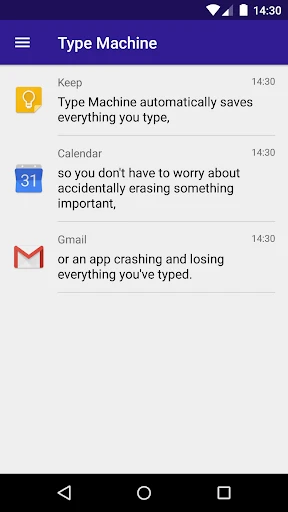
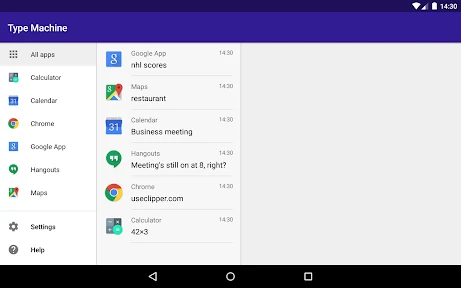
Your Digital Safety Net: Never Lose a Typed Word Again
Have you ever had that awful feeling when you accidentally delete a text or a whole note just disappears? If you're nodding along, then the Type Machine app could be your new favorite tool. I've been testing it out, and honestly, it's like a time machine for everything you type. Here's the lowdown on my experience with it.
So, What Exactly Is This App?
Think of an app that runs silently in the background, keeping a log of all the text you type in any other app. That's Type Machine in a nutshell. It's a brilliantly simple concept for Android that lets you relax, knowing your words are saved. Whether it's a long email, a quick idea, or a chat message, this app holds onto a history you can check anytime.
Getting Started
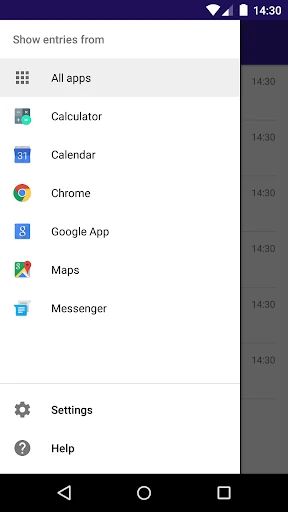
Getting Type Machine going was super easy. I grabbed it from the Play Store and had it ready in just a few minutes. It does need permission to see your text input, but that's just so it can do its job properly. Since privacy matters, I really liked that you can tell it to ignore specific apps, so your private stuff stays private.
What It's Like to Use
The app's design is clean and simple, which is a nice change from overly complicated apps. Looking back through my typing history was a smooth and easy process. You can sort your entries by the app you used or just search for a specific word. It doesn't overwhelm you with features; it just focuses on being a great text history tool.
Reasons You'll Be Glad You Have It
This app isn't only for people who are a bit forgetful. It's perfect for anyone who multitasks between apps or writes important messages on their phone. Remember when you typed something brilliant and then the app froze and you lost it all? With Type Machine, that frustration is over.
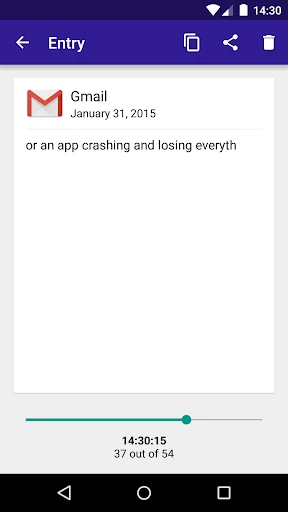
Another cool trick is how it can rescue text you deleted by mistake. I tried this out by deleting some text in a message, and I was able to get it back with no problem. It's like a safety net for all your typing.
Wrapping Up
In the end, Type Machine is a clever little app that does a great job of protecting the words you type. It does what it says without any hassle. If you use an Android phone, this could easily become an app you rely on every day. It's not on iOS, but Android users get a really handy tool for peace of mind.
So, if you're sick of losing important bits of text and want a dependable backup that works on its own, try Type Machine. You'll probably ask yourself how you managed before!
Advantages
- Automatically saves typed text.
- Supports various apps seamlessly.
- Easy to retrieve lost text.
- Minimal battery consumption.
- User-friendly interface.
Disadvantages
- Lacks cloud backup option.
- No support for images or media.
- Limited to text input only.
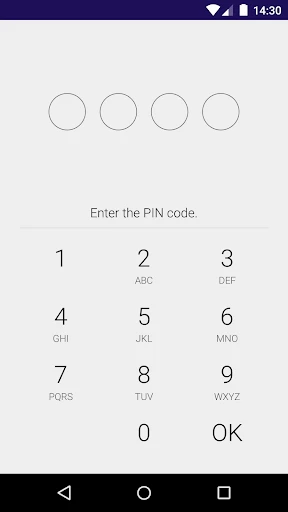
- No password protection feature.
- Occasional sync issues.
Frequently Asked Questions
Q: What is Type Machine and how does it work?
A: Type Machine is an app designed to save all your typed text across various applications on your device. It operates in the background to capture text as you type, storing it securely for later reference. This is particularly useful if you accidentally delete important information or need to retrieve unsaved text. The app ensures that your data is safe with encryption and allows you to access past texts easily.
Q: Is my privacy protected while using Type Machine?
A: Yes, Type Machine places a strong emphasis on user privacy. The app encrypts all stored data, ensuring that only you can access your saved text. It does not collect or transmit your text data to any external servers. You have complete control over which apps Type Machine monitors and can exclude sensitive applications from logging to maintain your privacy.
Q: Can Type Machine be used on all apps?
A: Type Machine is compatible with most apps on your Android device. However, it does not work with password fields or certain secure applications due to privacy protocols. Users can customize which apps are monitored through the settings, giving them flexibility to choose where the text logging will be active, ensuring it fits their specific needs.
Q: How can I access or retrieve my saved texts in Type Machine?
A: Accessing your saved texts in Type Machine is straightforward. The app provides an intuitive interface where you can browse through your history by application or date. You can search for specific text entries, view and copy them back into your current work. This feature is especially beneficial for recovering lost text, allowing you to continue your tasks seamlessly.
Q: Does Type Machine affect the performance or battery life of my device?
A: Type Machine is designed to run efficiently in the background without significantly affecting your device's performance or battery life. The app uses minimal resources, ensuring that your phone's speed and battery remain largely unaffected. Users have reported that the impact on battery life is negligible, making it a practical tool for those who need to safeguard their text entries.
Technical Information
Recommended for You

Video to MP3 - Video to Audio

Pic Collage Maker Photo Editor

Pengu - Virtual Pets

PDF Reader Zone

AXS Tickets

Photo Frame & Collage Maker

Adobe Premiere Rush

Sympla: Ingressos para eventos

MyShake Earthquake Alerts

Test DPC

Drivers Permit Practice

PeakVisor - 3D Maps & Peaks ID

Trulia Rent Apartments & Homes

Centi PRO - Currency Converter

Medium

HaloVPN Pro: Fast VPN Proxy

Rover - Dog Boarding & Walking

Cox Panoramic Wifi

White Noise: Baby Sleep Sounds

CAVA

Snowflake rose gold watch face

FloSports: Watch Live Sports

CCTV Camera Video Recorder App
