
Screenshots



My F1 TV App Review: A Fan's Dream Come True
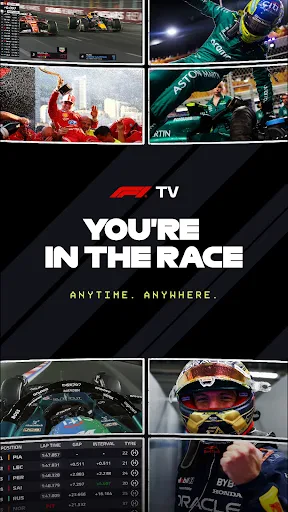
So, I finally got around to checking out F1 TV, and let me tell you, it's like a dream come true for any Formula 1 fan. I mean, if you're anything like me and live for the thrill of watching those sleek cars zoom around the track, you're going to love it. Let's dive into what makes this app a must-have for F1 enthusiasts.
Getting the App Up and Running
First things first, installing F1 TV was a breeze. Available on both Android and iOS, I found it on the app store, downloaded it, and was up and running in no time. The interface? Super slick and intuitive. You can tell a lot of thought went into making it user-friendly. Right from the get-go, you can see they’ve catered to both seasoned F1 fans and newbies alike.
The Cool Stuff You Can Do
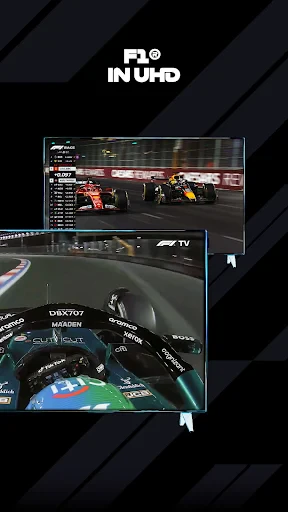
Now, let's talk about what you can actually do with this app. Live streaming is the big one here. You get to watch all the races live, and the quality is top-notch. No more pixelated streams or dodgy links. Plus, you have access to onboard cameras, team radios, and my personal favorite, live leaderboards. It’s like having a pit pass without the noise!
But wait, there's more! If you missed a race (how could you?!), they've got full race replays. And for those of you who love the nitty-gritty details, the app offers tons of exclusive documentaries and interviews. It’s like having the F1 world at your fingertips.
How It Actually Performs
Using the app was smooth sailing for the most part. I did notice a slight lag during peak times, but nothing that ruined the experience. The customizable viewing options were a nice touch. Imagine switching between driver cameras with just a tap. Total game changer, right?
And let's not forget the multilingual support—a godsend for international fans. It’s clear they’ve made an effort to include everyone, which is always a plus in my book.
Wrapping It All Up
All in all, F1 TV is a solid app that delivers what it promises. Whether you’re an F1 veteran or just getting into the sport, it’s a fantastic way to keep up with all the action. Sure, there might be a few minor hiccups here and there, but the overall experience is well worth it.
So, if you’re an F1 fan who hasn’t yet dived into this app, what are you waiting for? It’s time to rev those engines and get in on the action. Trust me, you won't regret it
Advantages
- High-quality live streaming.
- Exclusive onboard cameras.
- Real-time driver stats.
- Multi-language support.
- Ad-free experience.
Disadvantages
- Subscription required.
- Limited offline content.
- Not available in all regions.
- Occasional streaming lags.
- High data consumption.
Frequently Asked Questions
Q: What is F1 TV and what content does it offer?
A: F1 TV is a subscription-based streaming service dedicated to Formula 1 racing. It offers live streaming of all Formula 1 races, along with onboard cameras, team radios, and expert commentary. Subscribers also get access to an extensive archive of past races, exclusive documentaries, and behind-the-scenes content. It is designed for both die-hard fans and newcomers to the sport.
Q: How much does an F1 TV subscription cost and what are the available plans?
A: F1 TV offers two main types of subscriptions: F1 TV Pro and F1 TV Access. F1 TV Pro provides live streaming of all races and additional features, whereas F1 TV Access offers on-demand replays and highlights without live streaming. Prices vary by region but generally range from $2.99 to $9.99 per month, or there are annual plans available that offer some savings over the monthly options.
Q: Is F1 TV available worldwide?
A: F1 TV is available in many countries, but not all, due to licensing agreements. The availability of F1 TV Pro is more limited compared to F1 TV Access. It is important to check F1 TV's official website for the most updated list of countries where the service is offered. Some regions might only have access to certain features or content based on local broadcasting rights.
Q: Can I watch F1 TV on multiple devices simultaneously?
A: Yes, F1 TV allows subscribers to log in on multiple devices; however, streaming concurrently on more than one device might be restricted depending on the plan you have. Most plans allow at least two simultaneous streams, making it convenient for families or groups to enjoy the content together. It's advisable to check the terms of your specific subscription for detailed information.
Q: What devices are compatible with F1 TV?
A: F1 TV is compatible with a wide range of devices including smartphones, tablets, laptops, and smart TVs. It supports iOS, Android, and web browsers, ensuring flexibility for users to watch on the go or at home. Additionally, some content can be cast to a TV using devices like Chromecast or Apple TV, enhancing the viewing experience.
Technical Information
Recommended for You

Manus AI

My Earthquake Alerts Pro

NBC 4 New York: News & Weather

Vacasa - Vacation Rentals

Smart TV Cast: Screen Share

WebMD: Symptom Checker

AR Drawing: Sketch, Art, Trace

LongHorn Steakhouse®

Manga Renta

ConnectEBT

InColor: Coloring & Drawing

Al Quran Kareem: القران الكريم

Site Audit Pro

Phone File Recovery

Moonstories

HeyPiggy - Paid Surveys

Inkitt: Books, Novels, Stories

Music Recognition - Find Songs

Easy hairstyles step by step

Threads

The Dyrt: RV & Free Camping

VIN Check Report for Used Cars

Paramedic Protocol Provider
