
Sony | Sound Connect
Sony Sound Connect links Sony audio devices for seamless listening
Screenshots
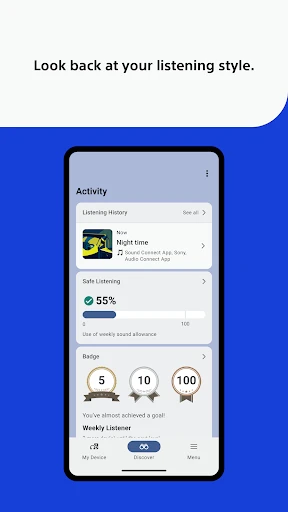
Sony | Sound Connect
Have you ever been right in the middle of your favorite playlist when a bad connection or tinny audio ruins the moment? That's the exact problem Sony | Sound Connect is meant to solve. This app aims to be the go-to for both serious music lovers and everyday listeners, delivering a smooth audio experience that makes you feel like you're in the heart of the music.
An Effortless and Easy-to-Use Design
First things first, the app's layout is a real winner. Sony | Sound Connect features a clean and straightforward design that's a breeze to use. Moving through the different sections feels as natural as listening to a perfectly flowing album. Connecting your phone or tablet to a compatible Sony speaker is just a few taps away. I found this incredibly handy when I needed to stream music to different speakers all over the house during a party. Setting up multiple devices at the same time? It’s seriously simple.
Sound That Truly Shines
Of course, an audio app needs to deliver on sound, and this one doesn't disappoint. The app supports high-resolution audio streaming, so you're hearing your music at its absolute best. I tried it out with my go-to playlist and was blown away by the clear, rich, and powerful sound. It honestly feels like you've got a private concert happening right in front of you.
A Rock-Solid and Stable Link
Another huge plus is the reliable connection it provides. No matter if you're using Bluetooth or Wi-Fi, the app works hard to keep those annoying drop-outs to a minimum. I tested it by walking from room to room, and the audio stayed perfectly connected the whole time. Say goodbye to those awkward moments of silence when your music suddenly cuts out.
Make the Sound Your Own
Perhaps the feature I love most is the amount of personalization available. You can fine-tune the audio settings to match exactly what you like, whether you want earth-shaking bass or crystal-clear high notes. The equalizer options are both detailed and simple to use. I experimented with a few settings and discovered that even small changes had a massive impact on how my music sounded.
So, is Sony | Sound Connect worth a download? If you care about great sound and a hassle-free experience, then the answer is a definite yes. The app doesn't just improve your listening; it also makes handling all your audio gear completely straightforward. It's like having your own personal sound expert right in your pocket.
To wrap it up, whether you're relaxing by yourself or throwing a party, this app guarantees your audio is always exceptional. Go on, test it out for yourself, and treat your ears to some truly amazing sound.
Advantages
- Seamless device connectivity.
- High-quality sound output.
- User-friendly interface.
- Customizable sound settings.
- Supports multiple device connections.
Disadvantages
- Limited compatibility with older devices.
- Requires stable internet connection.
- Frequent app updates needed.
- Some features are premium.
- Occasional connectivity issues.
Frequently Asked Questions
Q: What is Sony | Sound Connect and how does it enhance my audio experience?
A: Sony | Sound Connect is a versatile app designed to enhance your audio experience by allowing seamless connectivity and control over your Sony audio devices. Whether you're using headphones, speakers, or any other audio gadgets, the app provides an intuitive interface for managing sound settings, personalizing audio profiles, and ensuring optimal sound quality. It's ideal for audiophiles looking to get the most out of their Sony audio products.
Q: Is Sony | Sound Connect compatible with all Sony audio devices?
A: Sony | Sound Connect is compatible with a wide range of Sony audio devices, including headphones, speakers, and soundbars. However, it's important to check the device compatibility list on Sony's official website or within the app itself to ensure that your specific model is supported. Generally, newer models and those with Bluetooth capabilities are well-supported.
Q: What are the key features of the Sony | Sound Connect app?
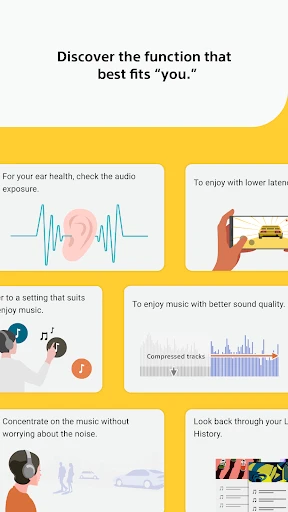
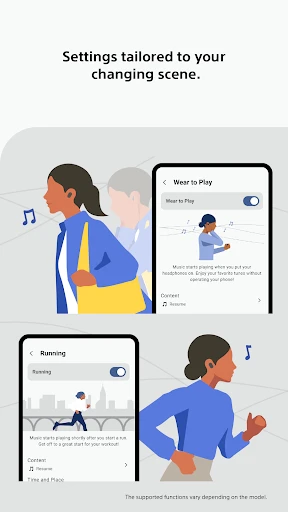
A: The Sony | Sound Connect app offers several key features, including personalized sound settings, easy device pairing, firmware updates for your devices, and access to a variety of sound modes to suit different listening environments. The app also allows users to manage multiple devices simultaneously, making it a handy tool for anyone using multiple Sony audio products. Additionally, it provides troubleshooting support for common connectivity issues.
Q: How user-friendly is the Sony | Sound Connect app for beginners?
A: Sony | Sound Connect is designed with user-friendliness in mind, featuring a clean, intuitive interface that guides users through device setup and sound customization processes. Even beginners will find it easy to navigate through the app, thanks to its step-by-step instructions and helpful tips. Whether you are adjusting sound settings or updating device firmware, the app simplifies these tasks to enhance user experience.
Q: Are there any costs associated with using Sony | Sound Connect?
A: Sony | Sound Connect is a free app available for download on both Android and iOS platforms. There are no hidden fees or subscription costs associated with its usage. However, while the app itself is free, the cost of compatible Sony devices and any potential data usage charges from your mobile network provider should be considered when using the app.
Technical Information
Recommended for You

Four | Buy Now, Pay Later

Easy Quran Mp3 Audio Offline

DaTuner: Tuner & Metronome

MyVeteransUnited

Xumo Play: Stream TV & Movies

Security Camera Mod Minecraft

Device Tree

randstad: jobs for workers

AI Art Photo Editor, Enhancer

Scary Neighbor Granny for MCPE

FotMob - Soccer Live Scores

Message Plus - SMS Messager

AI Photo Editor - AIFoto

Trail Boss BMX

Messages: SMS Text Messenger

Solo: Your Gig Business App

Font Keyboard: Text Fonts+

Neon Clock Wallpaper

Google Ads

Quiz AI: AI Homework Helper

Breaking News - Live Headlines

Rosetta Stone: Learn, Practice

AirReceiver AirPlay Cast DLNA
