
OsmAnd — Maps & GPS Offline
Offline Maps Navigation For Global Travelers
Screenshots



OsmAnd — Maps & GPS Offline
Ever found yourself in the middle of nowhere, desperately needing directions but with zero cellular signal? Yeah, we’ve all been there. That’s why OsmAnd — Maps & GPS Offline might just be the lifesaver you need. I recently gave this app a whirl, and here’s the lowdown from my experience.
When I first fired up OsmAnd — Maps & GPS Offline, I was greeted by a straightforward interface that didn’t overwhelm me with a million tabs or options. It’s pretty intuitive, so even if you’re not the most tech-savvy person out there, you should get the hang of it in no time. The app is free to download, but if you’re serious about offline navigation, consider the paid version. It packs some additional features that might be worth the bucks.
One of the standout features of OsmAnd is its offline maps. Once you download the maps of the areas you need, you can navigate even when you’re off the grid. The app uses OpenStreetMap data, which is both detailed and regularly updated by a community of enthusiastic mappers. I found it particularly useful when hiking in remote areas where cell service is spotty at best.
Another cool feature is the voice guidance. The app offers turn-by-turn directions, which means you can keep your eyes on the road or trail. Plus, it supports a ton of languages, so no matter where you’re from, you’re likely to find a familiar voice guiding you. The customization options are also quite impressive – you can tweak everything from map view to the navigation profile, which can be cycling, walking, or driving.
In terms of performance, OsmAnd does a commendable job. The maps load quickly, and I didn’t encounter any major lag while using it. The GPS accuracy was spot-on, and the app managed to recalibrate routes swiftly whenever I took a wrong turn. The only downside I noticed was that downloading maps can take up a bit of space on your device, so make sure you’ve got some storage to spare.
Usability-wise, the app is pretty friendly. There’s a bit of a learning curve if you want to dive into the advanced settings, but for basic navigation, it’s as simple as selecting your destination and hitting the road. The app also offers points of interest, which is handy if you’re exploring a new city and want to check out local attractions.
All in all, OsmAnd — Maps & GPS Offline is a solid pick if you’re after reliable navigation without relying on a data connection. Whether you’re an avid hiker, a frequent traveler, or just someone who loves exploring new places, this app could be your trusty guide. It’s not just about getting from point A to point B; it’s about discovering what’s along the way. And that, my friends, is what makes traveling such a joy.
Advantages
- Highly detailed offline maps.
- Customizable map appearance.
- Frequent map updates.
- Supports various map formats.
- Accurate navigation and routing.
Disadvantages
- Complex interface for new users.
- High battery consumption.
- Occasional map rendering lag.
- Limited real-time traffic updates.
- Paid features can be costly.
Frequently Asked Questions
Q: What features does OsmAnd — Maps & GPS Offline offer?
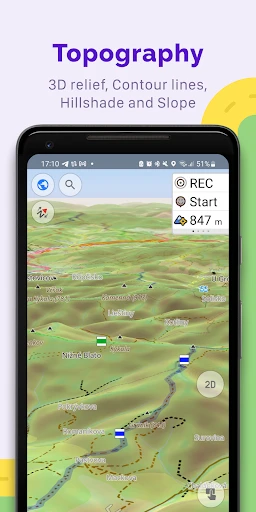
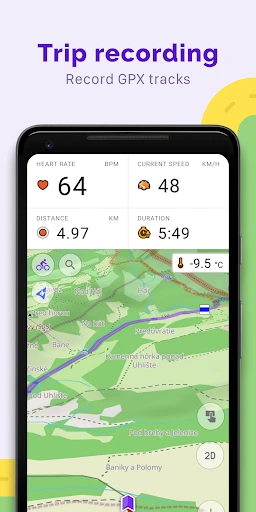
A: OsmAnd — Maps & GPS Offline offers a comprehensive suite of features for navigation and map usage without the need for an internet connection. It provides detailed maps with customizable layers that include points of interest, hiking routes, and contour lines. Users can enjoy turn-by-turn voice guidance, offline search, and route planning for driving, cycling, and walking. Additionally, it supports GPX track recording and has extensive configuration options to tailor the app to individual needs.
Q: How accurate are the offline maps in OsmAnd?
A: The offline maps in OsmAnd are highly accurate as they are based on OpenStreetMap (OSM) data, which is updated frequently by a large community of contributors worldwide. This ensures that the maps are up-to-date and detailed, including road networks, trails, and even minor pathways. However, the accuracy can also depend on the user's location and the availability of recent OSM updates for that region.
Q: Is OsmAnd — Maps & GPS Offline free to use?
A: OsmAnd offers both free and paid versions. The free version provides essential features with a limit on the number of map downloads. The paid version, known as OsmAnd+, offers unlimited map downloads, additional features like hourly map updates and access to premium features such as contour lines, hillshades, and more. Users can choose based on their needs and budget.
Q: Can I use OsmAnd for hiking and outdoor activities?
A: Yes, OsmAnd is particularly well-suited for hiking and outdoor activities. It includes detailed topographic maps, hiking routes, and the ability to record GPX tracks. Users can customize the app to show various map layers like contour lines and hillshades, which are helpful for outdoor navigation. The offline capabilities ensure you can navigate effectively without cell service, making it ideal for remote areas.
Q: What are the system requirements for installing OsmAnd on my device?
A: OsmAnd is available for both Android and iOS devices. For Android, it requires at least Android 5.0 or later, while iOS users need iOS 11.0 or later. It is compatible with smartphones and tablets. Due to the offline map functionality, the app may require a significant amount of storage space, so users should ensure they have adequate free space for downloading maps and additional data.
Technical Information
Recommended for You

Getcontact

Gaia: Streaming Consciousness

Дом с Алисой

Duke Energy

GPT Chatbot AI - Genie

Messenger - Texting App

Mangamello - مانجاميلو

Simple Drawing - Sketchbook

SkyView® Explore the Universe

All Document Reader:PDF Viewer

Perfectme: AI Photo Enhancer

ZEPETO: Avatar, Connect & Live

2nd Line+ Phone Number & eSIM

UFC

Little Nightmares Comics

Dormi - Baby Monitor

Psiphon: Fast and Secure VPN

Redfin: Buy, Sell & Rent Homes

PhotoCircle

Charleys Rewards

Sandboxx

Flowbird Parking

Threema. The Secure Messenger
