
KineMaster - Video Editor
Powerful mobile video editing for everyone
Screenshots

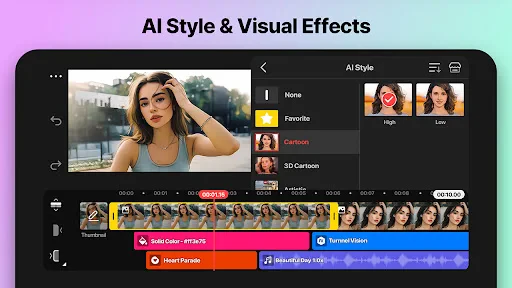
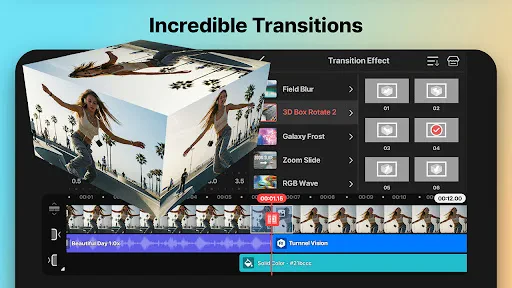
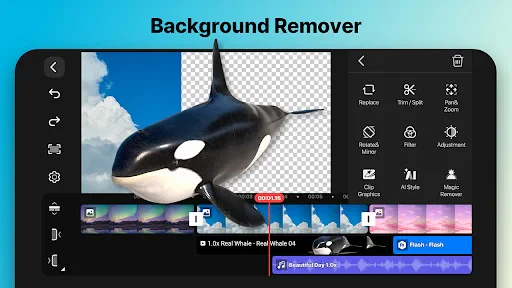

Have you ever wanted to create jaw-dropping videos right from your mobile device? Well, let me introduce you to KineMaster – a video editing app that's like having a mini production studio in your pocket. I’ve spent some time tinkering with it, and here’s the lowdown on why it might just be your next favorite app.
First things first, KineMaster packs a punch with its extensive range of features. From basic trimming and splicing to adding multi-layered effects, this app has got it all. You can literally layer videos, images, and text to your heart's content. Plus, with its chroma key feature, you can even play around with green screen effects. I mean, how cool is that?
And let’s not forget the audio capabilities. The app allows you to add background music, voiceovers, and sound effects. It’s like having a full-fledged audio suite right on your phone. Whether you’re a budding YouTuber or just someone wanting to spice up your Instagram stories, KineMaster has got your back.
One of the things that really stood out to me was how user-friendly KineMaster is. The interface is intuitive, making it easy for beginners to dive right in. The timeline view is similar to what you’d find in professional software, which is super handy when you’re trying to line things up perfectly. And if you’re ever stuck, there are plenty of tutorials to guide you through the process.
Now, I’ve got to say, I was impressed with how smoothly KineMaster runs. Even when working with multiple layers and effects, the app performed without a hitch. No one likes waiting for things to load, right? Well, with KineMaster, you can expect a seamless experience that keeps your creative flow uninterrupted.
KineMaster really shines when it comes to customization. You can adjust the colors, add filters, and even tweak the speed of your footage. The possibilities are endless. Plus, with its asset store, you have access to a plethora of effects, transitions, and music tracks to make your videos unique.
And here’s a nifty feature – you can export your videos in 4K quality. So, whether you're editing a short film or a simple birthday clip, your audience will see it in stunning detail.
To wrap it up, KineMaster is more than just a video editing app; it’s a powerhouse that caters to both novices and seasoned editors alike. It’s packed with features, easy to use, and delivers high-quality results. If you haven’t tried it yet, I’d say give it a shot. You might just find yourself hooked on creating amazing videos with ease.
So, what are you waiting for? Dive into the world of video editing with KineMaster and let your creativity run wild!
Unleashing Creativity: Features Galore
Advantages
- Intuitive user interface for easy editing
- Wide range of transition effects
- Supports multiple layers for video and audio
- High-quality video output
- Real-time video and audio recording
Disadvantages
- Watermark on free version
- Occasional app crashes
- Limited features without subscription
- Heavy on battery usage
- Large app size
Frequently Asked Questions
Q: What features does KineMaster offer for video editing?
A: KineMaster is a comprehensive video editing app that offers a wide range of features. Users can utilize tools such as multiple video layers, blending modes, voiceovers, chroma key, speed control, transitions, subtitles, special effects, and more. The app caters to both professionals and amateurs looking to create high-quality videos with ease.
Q: Is KineMaster suitable for beginners in video editing?
A: Yes, KineMaster is designed to be user-friendly for beginners while offering advanced features for experienced editors. The intuitive interface allows newcomers to easily navigate and use basic editing tools, while tutorials and guides are available to help them learn more complex features. This makes it a versatile tool for all skill levels.
Q: Does KineMaster support 4K video editing?
A: KineMaster does support 4K video editing on compatible devices. This allows users to edit high-resolution videos without sacrificing quality. However, it's important to ensure that your device has the necessary hardware capabilities to handle 4K processing smoothly, as older devices may experience performance issues.
Q: Are there any in-app purchases or subscription fees in KineMaster?
A: While KineMaster is free to download and use, it offers a premium subscription called KineMaster Premium. This subscription removes the watermark from videos, provides access to premium assets, and unlocks additional features. Users can choose between monthly or annual subscription plans based on their needs and frequency of use.
Q: Can I use KineMaster on both Android and iOS devices?
A: Yes, KineMaster is available for both Android and iOS devices. Users can download the app from Google Play Store or Apple App Store. The app offers similar functionalities across both platforms, ensuring a consistent editing experience regardless of the device you choose to use.
Technical Information
Recommended for You

Remodel AI - Home Renovation

Zangi Private Messenger

The Weather Channel - Radar

Max: Stream HBO, TV, & Movies

Messages : SMS & Private Chat

Magicbricks Buy, Rent Property

Pampers Rewards

GPS Speedometer & Odometer

Airlearn - Learn Languages

Weather app

Breaking News: Local & Alerts

Glassdoor | Jobs & Community

K-LOVE

FamilyWall: Family Organizer

CamToPlan

Truecaller: Caller ID Blocker

Mod Jalan Rusak Bussid Lumpur

FRANCE 24 - Live news 24/7

Color Widgets, Theme: iWidgets

Baritastic - Bariatric Tracker

Notion: Notes, Tasks, AI

Christmas Icon Pack

AllEvents - Discover Events
