
Jellyfin for Android TV
Enjoy Your Media Anywhere On Your Big Screen
Screenshots
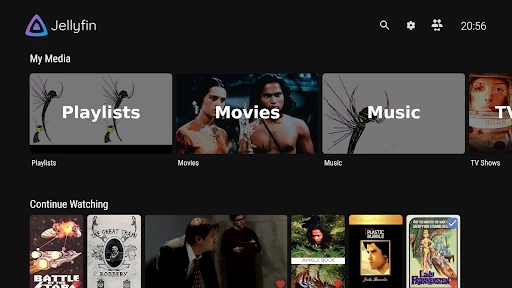
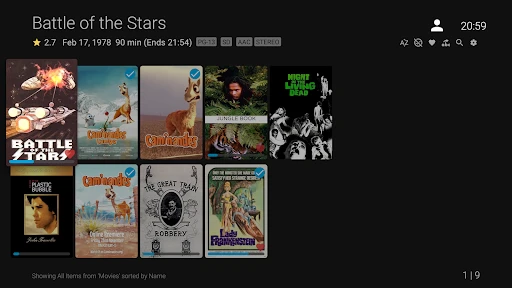

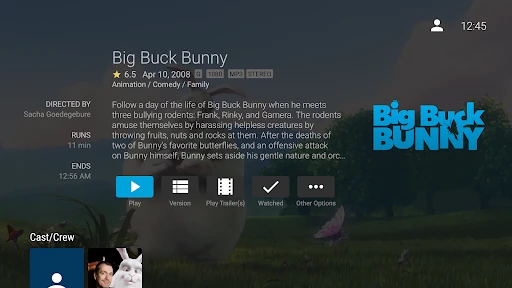
Jellyfin for Android TV
Have you ever felt the annoyance of jumping between different streaming apps just to watch all your favorite shows and movies? Let me tell you about Jellyfin for Android TV. Think of it as that amazing find you stumble upon; it gathers all your personal media into one tidy spot and does it with a style that's really appealing.
Getting Jellyfin Up and Running
Getting Jellyfin working on your Android TV is super straightforward. Honestly, it's just a matter of grabbing the app from the Google Play Store, opening it up, and linking it to your Jellyfin server. If you're someone who doesn't consider themselves super tech-savvy, no worries at all. The app walks you through each step with simple, clear instructions. Once you're connected, you'll be browsing your movie and music collection like an expert!
Smooth and Enjoyable Media Browsing
This app is designed to make your media look fantastic on your television. The layout is clean, contemporary, and really easy to use. Looking through your movies and shows is as easy as turning the pages of a nicely sorted book. You can make your own playlists, tag your most-loved items, and even change the appearance with different themes. And it also works with live TV! Picture yourself moving from a film to a live game without any hassle. It’s basically your own custom entertainment center.
How Well It Works and What It Supports
When it comes to performance, Jellyfin works beautifully on Android TV. It plays high-definition videos without a hitch, even when you're using a Wi-Fi connection. The app works with a huge variety of file types, so you probably won't need to convert your videos first. And the best thing? It works on most Android TV gadgets. Whether you have a top-of-the-line TV or a more affordable streaming stick, Jellyfin will work for you.
Putting Your Privacy First
A really great thing about Jellyfin is how much it cares about your privacy. It's not like some other media services that monitor what you watch or share your information. All your data is kept on your own server, meaning you are the one in complete charge. This is a massive benefit, particularly nowadays when keeping your data safe is so important. And since it's open-source software, you can be sure there's nothing shady going on behind the scenes.
In summary, if you want a capable, adaptable, and privacy-conscious media server for your Android TV, you should definitely try Jellyfin. It's filled with options that make watching your media both smooth and fun. So why not check it out? It could easily become your favorite app for all your entertainment!
Advantages
- Open-source and free to use
- Supports multiple media formats
- Easy to set up and customize
- No ads or tracking
- Cross-platform compatibility
Disadvantages
- Requires server setup
- Limited third-party integrations
- Can be resource-intensive
- Not as polished as competitors
- Occasional playback issues
Frequently Asked Questions
Q: What is Jellyfin for Android TV and how does it work?
A: Jellyfin for Android TV is an open-source media server application that allows you to manage and stream your media, such as movies, TV shows, music, and photos, to your Android TV device. It works by connecting to your Jellyfin server, which organizes and serves your media library. You can browse your content, create playlists, and enjoy a seamless viewing experience on your TV.
Q: Is Jellyfin for Android TV free to use?
A: Yes, Jellyfin for Android TV is completely free to use. As an open-source project, it does not require any subscription fees or in-app purchases. You can download the app from the Google Play Store and connect it to your Jellyfin server without incurring any costs. The community-driven nature of Jellyfin ensures continuous development and updates at no extra charge.
Q: How can I set up Jellyfin on my Android TV?
A: To set up Jellyfin on your Android TV, first ensure you have a Jellyfin server running on your network. Download the Jellyfin app from the Google Play Store on your Android TV device. Once installed, open the app and enter your server’s IP address or hostname, followed by your login credentials. After connecting, you can start streaming your media library directly to your TV.
Q: What features does Jellyfin for Android TV offer?
A: Jellyfin for Android TV offers a wide range of features to enhance your media experience. It supports direct play and transcoding, ensuring compatibility with various media formats. The app allows you to organize your media with custom libraries and metadata management. You can also create user profiles, set parental controls, and enjoy features like subtitle support and remote access to your library.
Q: Are there any limitations or known issues with Jellyfin for Android TV?
A: While Jellyfin for Android TV provides a robust media streaming experience, there may be occasional limitations or issues. Users might experience compatibility issues with certain media formats or encounter bugs, as it is an open-source project under continuous development. However, the active community and regular updates aim to address these issues and improve overall performance.
Technical Information
Recommended for You

Land Nav Assistant

DubStep Music & Beat Creator

Shipt: Shopper and Driver

Patreon
Zepp

Gruveo - Video Conferencing

FLY PDF

BabyTV - Kids Videos & Songs

The Roku Channel

Music Recognition - Find Songs

Football Chairman Pro 2

Guidebook

ALDI USA

Wansview Cloud

Chalkboard Fantasy Sports

Grammar Check by AI Writing

Messenger: Text Messages, SMS

Phone Tracker & GPS Location

Klook: Travel, Hotels, Leisure

Grab Driver: App for Partners

Google Lens

Ultimate IPTV Loader PRO

HotelTonight: Hotel Deals
