
MyNISSAN®
NISSAN Owner Vehicle Management App
Screenshots
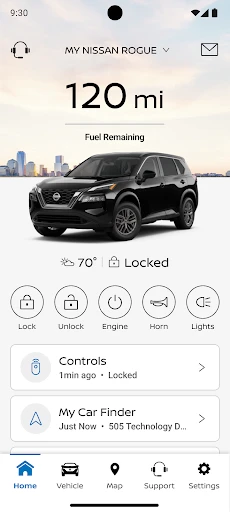
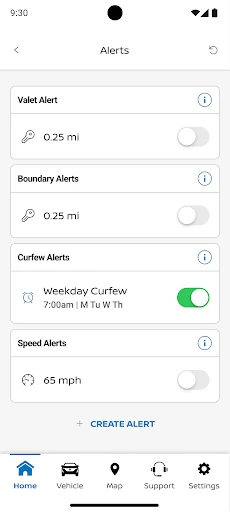
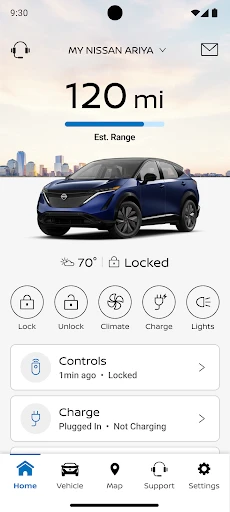
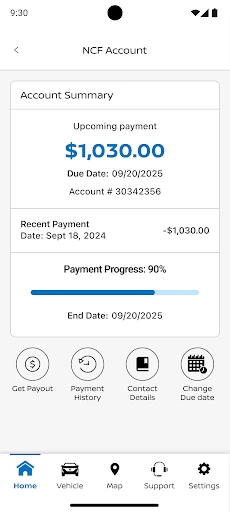
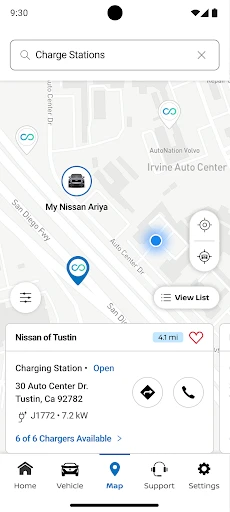
Getting Behind the Wheel with MyNISSAN®
If you've ever wanted to feel more in tune with your car, the MyNISSAN® app could be the perfect sidekick. I decided to test it out myself, and here's my take on this digital driving partner. Let's get started!
My Initial Thoughts
When I first opened MyNISSAN®, I was met with a neat and straightforward layout. It seems they really embraced a minimalist style, which I think is a big win. There's nothing more frustrating than an app that's cluttered with confusing buttons. This one keeps everything simple and clear—great for both tech lovers and those new to car apps.
The Features That Really Stand Out
Now, let's get into the features, because MyNISSAN® has plenty to offer. The Remote Start function is a personal favorite. On a chilly morning, starting your car to warm it up while you're still inside is absolutely brilliant. And during a hot summer day, cooling down the interior before you get in is just as awesome.
The app also gives you live updates on your car's health. This is super useful for staying on top of maintenance. It sends you alerts for oil changes, tire rotations, and even helps you track your service history. It's like having a personal assistant dedicated to your car's well-being.
Getting Around and Staying Connected
Another great aspect is the built-in navigation. While many people stick to Google Maps or Waze, having a native system in MyNISSAN® that's designed for your specific vehicle is really handy. It also connects smoothly with your car's display, making it easy to switch from your phone to the dashboard.
But the connectivity doesn't stop there. You can link your vehicle via Bluetooth for easy hands-free control. Whether you're taking calls or switching playlists, it helps you keep your eyes on the road.
Any Downsides?
Of course, no app is flawless. Although MyNISSAN® covers a lot, there are a few areas that could be better. For example, while the design is sleek, some might find the navigation a bit too basic. Adding a few more customization choices could really improve the user experience.
Also, while the app generally runs well, I noticed a slight delay here and there. It's not a major issue, but it's something that could be improved with future updates.
Wrapping It Up
Overall, MyNISSAN® is a reliable and helpful tool for any Nissan driver. It's filled with features that simplify car ownership and add to the fun. From remote start to maintenance alerts, it's like having your car's intelligence right on your phone.
If you drive a Nissan and haven't tried the app yet, I highly recommend checking it out. It's more than just an app—it's a way to enhance your time on the road. So why wait? Take the wheel and download MyNISSAN® today
Advantages
- User-friendly interface for easy navigation.
- Comprehensive vehicle information available.
- Real-time vehicle health updates.
- Remote control of vehicle features.
- Access to personalized maintenance reminders.
Disadvantages
- Limited functionality for older car models.
- Occasional connectivity issues reported.
- In-app purchases can be costly.
- Some features require paid subscription.
- User interface can seem cluttered at times.
Frequently Asked Questions
Q: What features does the MyNISSAN® app offer to enhance my driving experience?
A: The MyNISSAN® app provides a range of features designed to enhance your driving experience, including remote access to your vehicle, service appointment scheduling, vehicle health reports, and roadside assistance. You can also receive important notifications and updates about your vehicle's performance and maintenance needs directly through the app.
Q: Is the MyNISSAN® app compatible with all Nissan models?
A: The MyNISSAN® app is compatible with most Nissan models, especially newer ones equipped with the necessary technology. However, compatibility may vary based on the model year and specific features available in your vehicle. It's recommended to check the app's compatibility with your specific model on the official Nissan website or within the app store description.
Q: How secure is my data when using the MyNISSAN® app?
A: The MyNISSAN® app prioritizes user data security by implementing advanced encryption and security protocols to protect your personal information. Nissan ensures that all data transmitted between your device and their servers is secure, but users should also practice standard security measures like using strong passwords and keeping their app updated.
Q: Does the MyNISSAN® app require a subscription or any additional fees?
A: The MyNISSAN® app itself is free to download and use; however, some features may require a subscription or incur additional fees. For example, advanced connectivity services or remote access features might come with a subscription plan. It's advisable to review the app’s terms and conditions for detailed information on any potential costs.
Q: Can I schedule service appointments through the MyNISSAN® app?
A: Yes, the MyNISSAN® app allows you to conveniently schedule service appointments at your preferred Nissan dealership. You can select the type of service you need, choose a date and time that fits your schedule, and receive confirmation all within the app. This feature helps streamline your vehicle maintenance planning.
Technical Information
Recommended for You

XA Downloader - Video Saver

Food Lion

Google Meet

myAudi

SketchPad - Doodle On The Go

Learn Piano - Real Keyboard

OBD JScan

FlipaClip: Create 2D Animation

Droid Dashcam - Video Recorder

봄툰

Kitchen Design: 3D Planner

Apple Music

Cloud Storage: Cloud Drive App

850 OBD-II

Baby Monitor Saby - 3G Babycam

Spreaker Podcasts

Graphics Manager : GFX Addon

TruckMap - Truck GPS Routes

القرآن الكريم كامل بدون انترنت

Baby Development & Milestones

AppSheet

KYOTO Player

Learn Music & Songs Xylophone
