
Screenshots


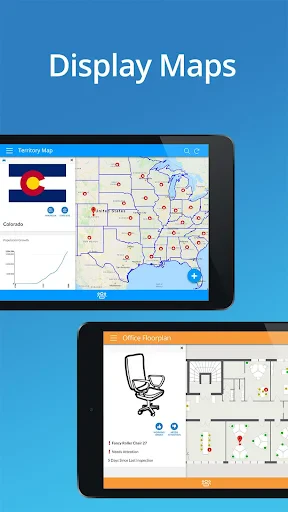

Build Your Own App Without Writing a Single Line of Code
Ever thought of creating your own app without writing a single line of code? Well, say hello to AppSheet, your new best friend in the world of app creation. Whether you're a small business owner looking to streamline operations or just someone with a brilliant idea, AppSheet empowers you to bring your vision to life effortlessly.
The first thing you'll notice when you dive into AppSheet is its user-friendly interface. Seriously, it's like the app wants you to succeed. All you need is a spreadsheet and you're good to go. Start by connecting your data source, whether it's Google Sheets, Excel, or any other popular platform. The app then takes that data and turns it into a fully functional mobile app. It's like magic!
One of the coolest features is the real-time data sync. Imagine updating your inventory on a spreadsheet and seeing those changes instantly reflected in your app. No more double entry or outdated information. Plus, the app supports offline access, which is a game-changer for businesses operating in areas with spotty internet connections.
Customization is another big win. You can tailor the app to fit your brand's look and feel, ensuring that every interaction aligns with your business's identity. And let's not forget about the automation capabilities. You can automate workflows, send notifications, and even integrate with other services like Zapier to keep everything running smoothly.
So, why should you give AppSheet a shot? For starters, it's incredibly cost-effective. Instead of hiring a developer or buying expensive software, you can build an app yourself at a fraction of the cost. Plus, the app's versatility means it can be used for a wide range of applications, from managing inventory to tracking sales leads.
But perhaps the most compelling reason is accessibility. You don't need to be a tech wizard to use AppSheet. It's designed for everyone, regardless of technical expertise. The step-by-step guidance and comprehensive support resources make it easy for anyone to create an app that meets their needs.
In a world where digital transformation is key, AppSheet provides a powerful tool for those looking to stay ahead of the curve. It's not just about creating an app; it's about creating solutions that drive efficiency and growth.
So, if you've been sitting on an app idea but didn't know where to start, AppSheet might just be the kickstart you need. Dive in, experiment, and see how this remarkable tool can transform your ideas into reality. Happy app building!
Advantages
- Easy to create apps without coding.
- Integrates with Google Workspace.
- Supports offline data access.
- Real-time data sync capabilities.
- Customizable app templates available.
Disadvantages
- Limited customization beyond templates.
- Requires Google account for setup.
- May have performance lags.
- Advanced features require paid plan.
- UI can be unintuitive for beginners.
Frequently Asked Questions
Q: What is AppSheet and how does it work?
A: AppSheet is a no-code platform that allows users to create mobile and web applications without any programming experience. It works by enabling you to connect your data sources, like Google Sheets or Excel, and then use the intuitive interface to design and customize your app. This makes it ideal for businesses looking to streamline operations with bespoke apps.
Q: Is AppSheet suitable for both beginners and advanced users?
A: Yes, AppSheet caters to both beginners and advanced users. Beginners can take advantage of its easy-to-understand interface and extensive templates to quickly build functional apps. Meanwhile, advanced users can delve deeper into customization options, leveraging advanced features like expressions, automation, and integrations to create more complex applications.
Q: What kind of support and resources are available for AppSheet users?
A: AppSheet provides a comprehensive range of support options, including an extensive library of tutorials, community forums, and documentation. These resources are designed to help users at all levels to maximize the potential of their apps. Additionally, users can access direct support from the AppSheet team for more specific queries and issues.
Q: Does AppSheet integrate with other tools and services?
A: Yes, AppSheet offers robust integration capabilities with a variety of tools and services. Users can connect their apps to popular platforms like Google Workspace, Office 365, Salesforce, and others. This allows for seamless data flow and enhanced functionality, making it easier for businesses to incorporate AppSheet into their existing workflows.
Q: What are the pricing options available for AppSheet?
A: AppSheet offers a range of pricing plans designed to suit different needs, from small businesses to large enterprises. There's a free tier available for personal use, which allows users to explore basic features. For more advanced features and higher usage, there are several paid plans, each providing varying levels of access and support to meet specific business requirements.
Technical Information
Recommended for You

@Voice Aloud Reader (TTS)

JB4 Mobile

Superhero Flying speedster

CDL Prep

Tim Hortons

Weather watch face W6.5

OBD2 Car Scanner - ELM Torque

Wasatch Backcountry Skiing Map

Webex

AlphaNovel — Books & Stories

Steak 'n Shake

Qustodio Parental Control App

Human Health Tracker

Garmin Drive™

Google Play Books & Audiobooks

Safe Surfer: Block Porn & Apps

Read Chan (Paid), 4chan Reader

Zoom Workplace for Intune

Offscreen Video Recorder

Flowbird Parking

Reverb: Buy & Sell Music Gear

2nd Phone Number - Call & Text

MobiOffice: Word, Sheets, PDF
