
MyDyson™
Control your Dyson purifier heater fan from anywhere
Screenshots
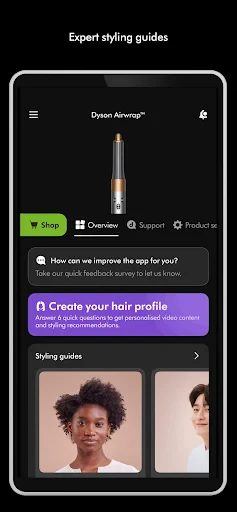
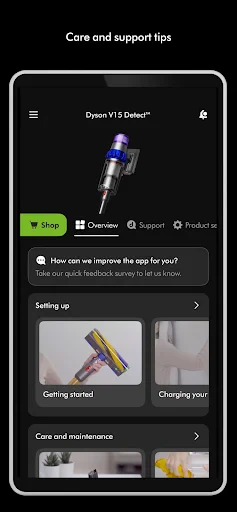

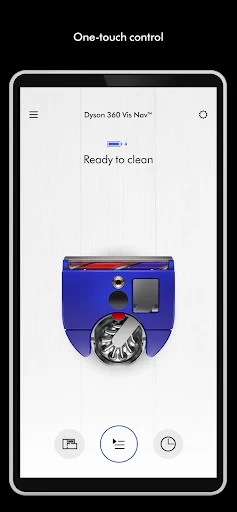
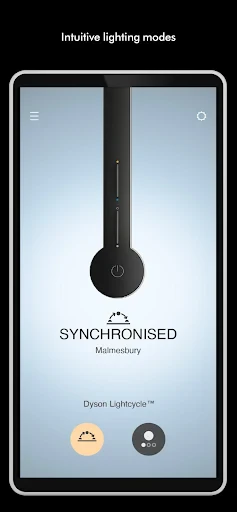
MyDyson™: Your Personal Assistant for Dyson Devices
Ever wondered what it's like to have a personal helper for all your Dyson gear? MyDyson™ makes that idea a reality! This application is your all-in-one partner for handling every Dyson product you own, directly from your phone. From vacuum cleaners to air purifiers and more, MyDyson™ brings them all together in one smooth, easy-to-use interface. Let's explore why this app is so essential for anyone with Dyson products.
A Beginner's Guide to the MyDyson™ App
The first thing you'll see when you launch MyDyson™ is its straightforward and user-friendly design. The app is built for simplicity, making sure everyone, even those not too comfortable with technology, can find their way around without trouble. Getting your devices connected is simple. Just link your Dyson products through Bluetooth or your home Wi-Fi, and that's it—you're ready to manage everything.
Noteworthy Functions You'll Love
A really cool feature of the MyDyson™ app is how it gives you live updates and alerts. Think about getting a notification when your air purifier's filter requires replacing or when your vacuum is ready for a service check. It’s as if your gadgets are communicating with you, making sure you know exactly what they need.
Plus, the app provides custom recommendations and guidance tailored to how you use your devices. So, if you’re using your Dyson vacuum a lot, the app could recommend the best cleaning times or care advice to ensure it stays in great shape. It's like having a Dyson specialist available whenever you need one!
Connecting with Your Smart Home
Nowadays, having your devices work together in a smart home is a big deal, and MyDyson™ fits right in. The app works smoothly with well-known smart home platforms such as Alexa and Google Assistant. This means you can operate your devices using just your voice. Want to switch on the air purifier while you’re busy in the kitchen? Just tell Alexa to handle it!
What It's Like to Use the App
The overall experience of using the app is excellent, with fluid navigation and fast loading. Its look isn't just nice—it's also practical. Every tool and setting is only a couple of taps away, making your time with the app both pleasant and productive.
Wrapping Up Our App Review
To sum it up, MyDyson™ is more than just an application; it's a vital tool for every Dyson product owner. It puts convenience, smart management, and advanced technology right in your hand. Whether you love technology or simply enjoy your Dyson appliances, this app will definitely improve how you use them. So, if you haven't given it a shot yet, why wait? Get MyDyson™ now and start managing your entire collection of Dyson products today
Advantages
- User-friendly interface for easy navigation.
- Comprehensive product support and guides.
- Personalized cleaning tips and schedules.
- Seamless integration with Dyson smart devices.
- Regular updates enhance app performance.
Disadvantages
- Limited functionality without Dyson products.
- Occasional connectivity issues reported.
- Requires account creation to use app.
- Lacks offline access for product guides.
- Notification settings need more customization.
Frequently Asked Questions
Q: What is MyDyson™ app and how does it work?
A: The MyDyson™ app is designed to enhance the functionality of your Dyson products. By connecting your Dyson devices, such as vacuums, air purifiers, or hair care tools, to the app, you can control them remotely, schedule cleaning sessions, monitor performance, and receive maintenance alerts. This seamless integration aims to provide users with a more convenient and efficient experience in managing their Dyson products.
Q: Is MyDyson™ compatible with all Dyson products?
A: While MyDyson™ supports a wide range of Dyson products, it may not be compatible with all models. Typically, the app works best with the latest smart-enabled devices, allowing for features such as remote control and performance tracking. It's crucial to check the compatibility of your specific Dyson model on the official Dyson website or within the app before downloading.
Q: Does the MyDyson™ app require an internet connection to function?
A: Yes, the MyDyson™ app requires an active internet connection to perform many of its functions effectively. Features such as remote control, firmware updates, and cloud-based performance tracking are reliant on internet connectivity. However, some basic features might still be accessible offline, depending on the specific device and its capabilities.
Q: Are there any costs associated with using the MyDyson™ app?
A: The MyDyson™ app itself is free to download and use. However, it's important to note that while the app enhances the functionality of your Dyson products, any additional features or accessories that require purchase, such as replacement filters or additional tools, are not covered by the app and may incur additional costs.
Q: How does MyDyson™ ensure the privacy of its users?
A: MyDyson™ prioritizes the privacy and security of its users by implementing robust data protection protocols. The app collects only necessary data to enhance device performance and user experience, and it complies with privacy regulations to safeguard personal information. Users can also customize their privacy settings within the app to control data sharing and notifications.
Technical Information
Recommended for You

Plus Messenger

BookFunnel

Fomz

Coin Value - Coin Identifier

Desygner: Graphic Design Maker

Procare: Childcare App

Giant Food

Baby & Breastfeeding Tracker

GettingOut Visits

Niagara Launcher ‧ Home Screen

Traeger

Minichat – The Fast Video Chat

Call Blocker - Block Numbers

Reverse Charging Wireless

US Public Lands

Altimeter Variometer (Wear OS)

Compose Material Catalog

Photoroom AI Photo Editor

CL theme V1

Question.AI - Chatbot&Math AI

Edmunds - Shop Cars For Sale

MoneyLion: Bank & Earn Rewards

eDrawings
