
myGMC
GMC Owners Access Vehicle Info Remotely
Screenshots

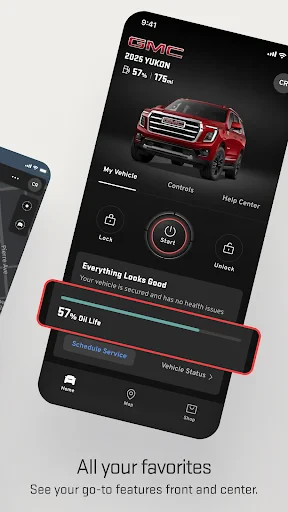


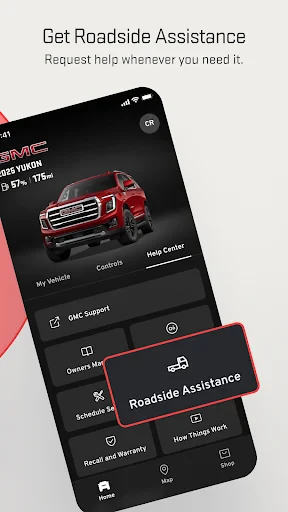
myGMC: Your Ultimate Guide to the App
Getting Your myGMC App Up and Running
First things first, you'll need to get the app on your phone. It's available for both Android and iOS, so it doesn't matter what kind of phone you have. After you download it, just sign in using your GMC account details. Once you're in, you'll see a clean and modern dashboard that's easy to understand, like a helpful friend showing you the ropes.
Handy Features You'll Love to Use
The myGMC app is loaded with cool tools that are super useful. The remote access is probably the best part. Think about being able to start your car from inside your house on a cold day. It’s as great as it sounds!
But there's more. You can also lock and unlock your doors from a distance, which is surprisingly helpful. Can't remember where you parked? The vehicle locator feature will find it for you. It's like having a personal assistant for your car.
Driving Made Simpler and Smarter
Another great tool is the navigation and map help. It gives you live traffic updates so you can always take the best route, saving you time and keeping you calm. It feels like having a navigator who never gets lost.
If you're getting ready for a trip, you can send your destination straight to your car's navigation system from the app. It makes getting ready for a journey easy and even a little fun.
Always Know How Your Car is Doing
If you ever worry about your car's condition, the vehicle status feature will give you peace of mind. It shows you real-time info on things like how much gas you have and your tire pressure. It's like having a constant health check-up for your car, right in your pocket.
You’ll also get reminders for when your car needs service. It’s a great way to keep your vehicle running smoothly without having to remember the schedule yourself.
Wrapping It All Up
All in all, myGMC is more than just an app; it's a partner that makes driving better. From the convenience of remote start to the confidence of knowing your car's health, this app has you covered. It's the ultimate multi-tool for your vehicle, ready to help with almost anything.
If you've ever wanted a smarter way to connect with your car, myGMC is the answer. So, if you haven't tried it yet, go ahead and download it. You'll be glad you did
Advantages
- User-friendly interface for easy navigation.
- Comprehensive vehicle diagnostics feature.
- Remote start and stop functionality.
- Real-time location tracking for vehicles.
- Maintenance reminders and alerts.
Disadvantages
- Limited compatibility with older GMC models.
- Occasional connectivity issues with app.
- Requires stable internet for optimal performance.
- Some features need in-app purchases.
- Battery drain observed on prolonged use.
Frequently Asked Questions
Q: What is the myGMC app used for?
A: The myGMC app is designed to enhance your GMC vehicle ownership experience by providing control over various vehicle functions from your smartphone. Users can remotely start or stop the engine, lock or unlock doors, and even check the vehicle’s status such as fuel level and tire pressure. The app also offers convenient access to important vehicle information and service scheduling.
Q: Is the myGMC app compatible with all GMC vehicles?
A: While the myGMC app is compatible with a wide range of GMC vehicles, it is important to check if your specific model and year are supported. Generally, newer models with built-in connectivity features are more likely to be compatible. Checking the app store description or contacting GMC support can provide detailed compatibility information.
Q: What features does the myGMC app offer?
A: The myGMC app provides several features including remote vehicle start, stop, and lock/unlock capabilities. It allows you to view real-time vehicle diagnostics like oil life, fuel level, and tire pressure. Additionally, the app can track your vehicle’s location, provide maintenance reminders, and facilitate service scheduling directly from your mobile device.
Q: Is there a cost associated with using the myGMC app?
A: The myGMC app itself is free to download. However, certain features may require a subscription to GMC’s Connected Services or OnStar plans. These subscriptions can offer enhanced features such as Wi-Fi hotspot capabilities, advanced diagnostics, and more. It's advisable to review the subscription plans to understand any potential costs fully.
Q: How do I troubleshoot connectivity issues with the myGMC app?
A: If you experience connectivity issues with the myGMC app, first ensure that your smartphone has a stable internet connection. Sometimes, restarting your phone or the app can resolve issues. If problems persist, checking for app updates or resetting the app settings might help. For persistent issues, contacting GMC customer support or visiting a dealership can provide further assistance.
Technical Information
Recommended for You

Screen Recorder - G1REC

Red Robin

NetShare - no-root-tethering

HiPaint -Sketch Draw Paint it!

HD Camera: Professional Camera

Google’s Find Hub

Pray Daily - KJV Bible & Verse

Wavy: Photo Editor & AI Art

OctaApp – Donate Blood Plasma!

QVC Mobile Shopping (US)

Olympics: Live Sports & News

Artistry Virtual Beauty

Cox

Mahjong Dots Elimination

SelfComic: Super Saiyan Photo

PCH+ - Real Prizes, Fun Games

My Kitchen: 3D Planner

TransUnion: Credit Monitoring

ACME Markets Deals & Delivery

MyNISSAN®

aTranslator - Text & Voice

Costco Wholesale

eBay online shopping & selling
