
Open Camera
Best free camera app for Android photography
Screenshots



Unleashing Creativity with Open Camera
Ever found yourself scrolling through the app store, trying to find the perfect camera app to up your photography game? Well, let me introduce you to Open Camera. It's like finding that perfect coffee blend that just hits differently every morning. If you're tired of the basic camera app on your phone and want something that feels more professional, Open Camera might just be what you're looking for.
A Look at the Handy Tools
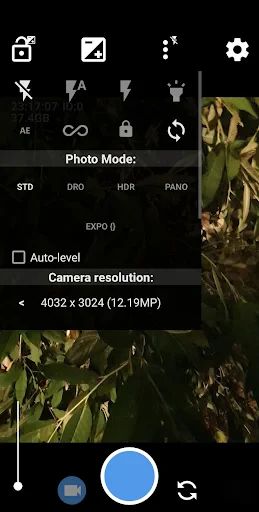
Open Camera is packed with features that make you feel like a pro. First off, the interface is incredibly intuitive, which means you don't need a degree in photography to get the hang of it. I was pleasantly surprised by the autofocus and auto-stabilization features. I mean, who doesn't want their photos to look like they were taken by a steady-handed pro? Plus, the HDR mode is a game-changer. It captures stunning details, bringing out the vibrancy in every shot.
One of the things I love is the exposure control. Whether you're shooting under the harsh midday sun or in the soft glow of the evening, you can adjust the exposure to get that perfect shot. And let's not forget the timer and burst mode. Perfect for when you're trying to capture the perfect jump shot or a group photo without missing a beat.
Make It Truly Yours
What sets Open Camera apart is its level of customization. You can tweak pretty much everything to suit your style. Want to adjust the ISO, white balance, or even the focus distance? Go right ahead. The app gives you the ability to fine-tune your settings just like a DSLR camera. It’s a playground for photography enthusiasts who love to experiment and push the boundaries of what their phone camera can do.
For those of you who love to shoot videos, Open Camera doesn't disappoint. You can record in different resolutions, adjust the frame rate, and even use an external microphone for better audio quality. It’s like having a mini film studio right in your pocket.
The Perks of Being Free and Open
Probably one of the coolest things about Open Camera is that it’s open source. This means it's constantly being improved by a community of developers who are passionate about making it the best it can be. And did I mention it’s free? Yup, no hidden costs or annoying ads popping up every few seconds. It’s just you and your creativity, no strings attached.
Wrapping It All Up
So, would I recommend Open Camera? Absolutely! Whether you're a seasoned photographer or just someone who loves capturing moments, this app is worth checking out. It's user-friendly, packed with features, and gives you that professional feel without breaking the bank. Plus, the fact that it's open source means it's always evolving and getting better. So why not give it a shot and see how it transforms your photography experience? Trust me; you won’t be disappointed.
Advantages
- Highly customizable settings.
- Open-source and free to use.
- Supports external microphones.
- HDR and DRO photo modes.
- Lightweight and fast app.
Disadvantages
- Complex interface for beginners.
- Limited customer support.
- Occasional app crashes.
- No built-in photo editor.
- Ads in the free version.
Frequently Asked Questions
Q: What is Open Camera and what features does it offer?
A: Open Camera is a free, open-source camera app for Android devices that offers a wide range of features. These include auto-stabilization, various scene modes, color effects, white balance, exposure compensation, and more. It also supports remote control via voice commands and configurable volume keys, making it a versatile tool for photography enthusiasts.
Q: Is Open Camera suitable for professional photography?
A: While Open Camera offers numerous features suitable for both amateur and advanced photography, it may not completely replace professional cameras. However, it provides excellent manual controls, including focus modes, exposure, and ISO settings, making it a great option for those wanting to experiment with professional photography techniques on their smartphones.
Q: Can I use Open Camera for video recording?
A: Yes, Open Camera supports video recording with features like adjustable frame rates, video stabilization, and the ability to record in different resolutions, including HD. It also allows users to apply various effects and control audio sources, making it a handy tool for capturing quality videos on a mobile device.
Q: Are there any ads or in-app purchases in Open Camera?
A: Open Camera is entirely free to use, with no ads or in-app purchases. This ensures a seamless user experience without interruptions, making it an appealing choice for users who prefer ad-free applications. Being open-source, it continually benefits from community contributions and updates.
Q: How does Open Camera compare with the built-in camera app on Android devices?
A: Open Camera offers more manual controls and customization options compared to the default camera apps on most Android devices. Users can adjust settings like ISO, exposure, and focus manually, which might not be possible with built-in apps. This makes Open Camera a preferred choice for users looking for more control over their photography.
Technical Information
Recommended for You

BloomChic | A Re-Imagining

Falou - Fast language learning

DraftKings Pick6: Fantasy Game

Baby Names / First Names 2025

Pregnancy Calculator: Due Date

Transit • Subway & Bus Times

Bookmory - reading tracker

MM-Calendar

Planta: Plant & Garden Care

Audio & Music Player

Schoox Classic

Whova - Event & Conference App

Google Maps

FamilySearch Tree

Slim Chickens

Breeze Airways

Phone Tracker By Number in US

Material Cleaner & Manager

Offline Music Player

PhotoScan by Google Photos

Rapido: Bike-Taxi, Auto & Cabs

ThemePro - Widget & Wallpaper

Empower®
